The best fit depends on how much of the beat you want the grid to own. Songen is the strongest all-in-one option for editable lead, chord, bass, and drum loops on Apple devices. Baza Drums is the deeper desktop choice when you want per-instrument MIDI control. CedarGrooveNET is the useful free specialist for turning an existing drum recording into a MIDI pattern or continuing it in a few supported styles.
Quick Ranking
| Rank | App | Best For | Grid Output | Platforms | Price |
|---|---|---|---|---|---|
| 1 | Songen | Complete editable beat loops | MIDI, lossless WAV, separate stems | iPhone, iPad, Mac | Free tier; Premium available |
| 2 | Baza Drums | Detailed desktop drum programming | MIDI patterns | Windows, macOS | €59 one-time purchase |
| 3 | CedarGrooveNET | Free drum transcription and continuation | Standard MIDI files | Web, macOS | Free |
What Grid-Based AI Beat Making Requires
A grid-based beat app should give you notes you can see and change: kick, snare, hats, percussion, bass, chords, or lead events placed against beats and bars. That matters when a generated loop is close but the backbeat is late, the hi-hats are too dense, or a fill lands in the wrong section. Audio-only generation can suggest a sound, but a MIDI or piano-roll workflow lets you swap instruments, edit velocities, change swing, and arrange sections in a DAW.
The three choices here solve different grid problems. Songen starts with a complete multi-track loop and lets you refine it. Baza Drums concentrates on drum MIDI with controls for each instrument and pattern variation. CedarGrooveNET begins with recorded drum audio, detects its hits, and gives you an editable MIDI result before extending the pattern.
Ranked AI Grid-Based Beat-Making Apps
1. Songen — Best For Complete Editable Beat Loops
Songen is the best match when “beat making” means building more than a drum groove. It generates a full loop containing lead, chords, bass, and drums in a chosen style, then lets you work track by track and section by section. Its piano roll is designed to understand the chord playing, which can guide note edits instead of leaving you with an empty grid.
Shopping ad

- Take Control of Your Performance – Essential performance controls are a single button-press away: stop, solo, mute, record arm and set your levels, pans and sends. Using Launchpad X is a simple as it gets, no drivers to install, just plug and perform
- Dynamic and Expressive Playing – Large RGB velocity- and pressure-sensitive pads give you a perfect reflection of your Ableton Live or Logic Pro session, matching colors from the session window to your Launchpad X
- Our Deepest Ableton Live Integration – Quickly launch clips and scenes, access mixer, device, and transport controls, and quantize, duplicate and double, all without touching your mouse. Capture MIDI makes sure you never lose an idea
- Make It Yours with Four Custom Modes – Go deeper with Launchpad X and use Novation Components to customize MIDI mappings, and control almost anything; four custom modes mean you can design how this essential grid controller works for you
- Dynamic Note & Scale Modes – Effortlessly play in-key basslines, melodies, chords and leads. Launchpad X even knows when you’re drumming and shows your drum rack on the grid. Easily explore, build, and play complex chords straight from the grid
That structure suits a producer who wants a fast starting arrangement but still needs conventional MIDI editing. You can regenerate a section, keep the parts that work, and finish individual notes in the piano roll. Songen exports MIDI, lossless WAV audio, and separate stems offline, so the same idea can move into a DAW as editable notes, a rendered reference, or isolated parts.
The free tier provides 100 generated loops per day and one free export. Premium unlocks unlimited generating and exports. Songen runs on iPhone and iPad through the App Store and on Mac through the Mac App Store; there is no Android or Windows version.
A practical grid workflow is:
- Generate a loop in the style closest to the track you are making.
- Regenerate only the section that needs a different groove or phrase.
- Open the piano roll and correct the notes that clash with the chord shown by the editor.
- Export MIDI for continued editing, or export WAV and separate stems when you need audio parts.
Songen states that its generated beats are royalty-free and that you own what you make, including the ability to sell, license, or release songs without clearance, attribution, or extra fees. Keep that statement tied to Songen’s own terms and review the current terms before releasing work that includes other people’s recordings or voices.
Shopping ad

- Seamless performances made easy - 64 vibrant RGB pads give you a perfect reflection of your Ableton Live session, making it easier than ever to see your clips. Know exactly which clips you are triggering for a seamless performance
- The perfect companion for Ableton Live - Quickly launch clips and scenes at the press of a button with our exceptional Ableton Live Integration. Stop, Solo, and Mute controls make it easier/more tactile to control performances right from Launchpad Mini
- Full of customization for your needs - Novation Components is a tool to help you customize your Launchpad Mini. With three Custom Modes, edit mappings and control anything MIDI easily
- Anytime. Anywhere. Launchpad Mini’s slim, lightweight design means it’ll fit into any setup, so that you have the control you need at all times. The bus-powered hardware is perfect for when you’re travelling around and need to save space
- Get started easily - It’s never been easier to get started. Download all the software you want with step-by-step video guides to get you set up and making music in minutes through Novation's interactive on boarding
2. Baza Drums — Best For Detailed Desktop Drum Grids
Baza Drums is the strongest choice for a desktop producer who wants AI help without giving up drum-by-drum control. It generates MIDI drum patterns from style-inspired models such as House, Breakbeat, and Hybrid. You can regenerate an individual instrument, lock parts you want to keep, mute a lane, and adjust density, velocity, or shift.
Recommended Free Tools
Its grid controls are unusually concrete for a drum-focused tool. Swing changes the feel, Length sets the step count up to 32, and Shift offsets an instrument pattern. Parallel and Beam variations provide alternate patterns, while MIDI drag-and-drop, file export, DAW routing, and external hardware support make the result useful beyond the plug-in window.
Baza Drums costs €59 as a one-time purchase. It supports Windows and macOS, with VST3 and AU formats and legacy VST2 where the host supports it. The output is MIDI, so you supply the drum instrument or sampler that creates the final sound. That separation is useful when your mix depends on a particular 808, 909, acoustic kit, or processed percussion chain.
Shopping ad

- ✔Music Production Made Easy: 64 responsive MIDI pads controller connects to iPhone/iPad via lightning or USB cable for on-the-go music production. TempoPAD Z-1 64-Beat Maker Machine with Easy Mode for Beginners, making it simpler than ever to visualize. With its large and tactile pads, it's fun to learn for a beginner and casual musicians
- ✔Striking RGB Beat Pad: Synido TempoPAD has bright 8x8 thick soft silicone music pads that are fully customizable to your specific needs for triggering dynamic drumming, effects, and more midi commands. Powerful compatibility with most Light Show Projects for 4 Ambient Modes: Marquee Mode, Rhythm Mode, Note Dance Mode, and Diffusion Mode
- ✔Play Chords Across 4 Octaves with One Finger: Revolutionize your workflow with fixed chord mode on your MIDI Controller. Quickly lay down chords that span higher and lower notes with one hand. This game-changing feature transposes your chord shapes as you move up and down in keyboard mode. From soft rhythms to bold beats, 4 Velocity Sensitivity for excellent expression freedom
- ✔Mix Like A Pro, 5 Modes: Easy/Drum/Key/User/Custom Mode, empowering you to orchestrate your live sets. Ideal for music performances, playing, finger drumming, and music production, the pitch fader, crossfader, and cue/master volume knobs provide club-level control over your launchpad(Just a heads up: MIDI PADS don't make sound by themselves)
- ✔Compatible Control: Fully compliant USB MIDI output for use with any iOS, Mac, or DAW without additional drivers. Wherever inspiration strikes, portable Launch 64 pad keeps you in control, powered by its own energy and featuring an arpeggiator. Complete with Synido shoulder bag for seamless portability—your package is ready to kickstart musical adventure
For a four-bar house idea, set Length to the required step count, choose a house-oriented model, then use Swing to move the groove away from a rigid straight grid. Lock the kick while regenerating hats or percussion, lower density on a verse pattern, and use Shift to create a variation for the turnaround. Drag the MIDI into your DAW and audition it through your own drum sounds.
Baza’s supplied material establishes MIDI generation and editing, but it does not state a free plan, audio export, or a commercial-use license. Check the vendor’s current terms for rights and supported host details before committing a release workflow.
3. CedarGrooveNET — Best Free Tool For Drum Audio To MIDI
CedarGrooveNET is the practical pick when your starting point is a drum recording rather than an empty sequencer. In the browser, it transcribes WAV, MP3, AIFF, or FLAC drum loops into MIDI, then can generate continuations with groove and genre controls. Its encoder-decoder LSTM model was trained on thousands of drum patterns, and the continuation feature supports Drum & Bass, House, and Rock with 10 sub-styles in each category.
Shopping ad

- Our Deepest Ableton Live Integration – Quickly launch clips and scenes, access mixer, device, and transport controls, and quantize, duplicate and double, all without touching your mouse. Capture MIDI makes sure you never lose an idea
- Dynamic and Expressive Playing – Large RGB velocity- and pressure-sensitive pads give you a perfect reflection of your Ableton Live or Logic Pro session, matching colors from the session window to your Launchpad Pro
- Powerful Four-track, 32-step Sequencer – Create tracks with Launchpad Pro's sequencer, featuring eight-note polyphony, pattern chaining and scenes to create and trigger longer sequences. Transform your patterns on the fly with probability/mutation
- Dynamic Note & Scale Modes – Effortlessly play in-key basslines, melodies, chords and leads. Launchpad Pro even knows when you’re drumming and shows your drum rack on the grid. Easily explore, build, and play complex chords straight from the grid
- Control MIDI-compatible Hardware, Software, Or Both – Tailor Launchpad Pro to your setup. Use Custom Modes to send MIDI commands to software/hardware simultaneously. Hook Launchpad Pro up to an all-hardware rig using MIDI In, Out and Out 2/Thru ports
The grid is useful for cleanup and extension: draw directly on it, edit hits, and style the pattern before exporting a Standard MIDI file. Because it exports MIDI rather than audio, you can route the result to your own sampler and replace every sound while preserving the detected rhythm. The free tool accepts clips up to six minutes and uploads up to 100 MB, with no account, subscription, or credit card required.
A concrete workflow is to upload a short recorded loop, inspect the detected kick and snare positions, draw corrections on the grid, choose a continuation style, and export the MIDI file for further arrangement. For example, a Rock continuation can supply a new bar after a recorded fill, while a House sub-style can suggest a more regular four-on-the-floor extension. The controls are pattern-focused rather than a way to generate a complete instrumental beat.
CedarGrooveNET is drums only. It has no pitch detection, so it cannot transcribe piano, guitar, bass, vocals, or melody, and it will not convert a full song into MIDI. Its stated terms cover the free tool and exports, but do not establish a separate commercial-use license; check the current site terms before releasing music built from an uploaded recording or generated continuation.
What’s actually slowing this PC down?
Pick the symptom - the matching free tool is one click away.
Shopping ad
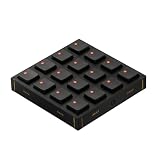
- Expressive Hall Effect Control: Features 16 velocity- and pressure-sensitive MX Gateron Hall effect switches that provide nuanced input for finger drumming and sample triggering. The switches are hot-swappable (by removing the front panel) to suit your tactile preferences.
- Dynamic RGB Feedback: Each button is equipped with a fully configurable RGB LED, allowing you to adjust brightness, assign custom colors, or add pulsing animations via the Grid Editor. The default keycaps feature cutouts for maximum visibility and are interchangeable to fit your workflow.
- Modular Magnetic System: Built with an innovative magnetic interface that allows the module to connect seamlessly in any direction with other Grid controllers. The fiberglass front panel features a new textured finish for improved grip and durability during rigorous daily use.
- Deep Customization: Beyond standard MIDI control, the BU16 supports HID keyboard, mouse, and game control modes. Use the Grid Editor to program complex macros using LUA code, or configure buttons for momentary, two-step, and three-step toggles.
- Universal Compatibility: Plug-and-play operation via high-speed USB-C. Compatible with Mac OS, Windows, Linux, and mobile platforms, making it an ideal controller for DAWs (Ableton Live), VJ software, or creative productivity apps (Adobe Creative Cloud).
Choose By Your Starting Material
- Starting with an idea for a whole beat: Choose Songen when you want lead, chords, bass, and drums generated together and then edited in a piano roll.
- Starting with a DAW drum arrangement: Choose Baza Drums when per-instrument regeneration, swing, step length, velocity, and routing matter more than rendered audio.
- Starting with a recorded drum loop: Choose CedarGrooveNET when transcription to MIDI and free browser access are the priority.
- Need Windows: Baza Drums is the listed Windows option. Songen is listed for Apple devices, while CedarGrooveNET is listed for web and macOS.
- Need audio and stems from the app: Songen explicitly lists lossless WAV and separate stem exports. Baza Drums and CedarGrooveNET list MIDI output, so plan to use your own instruments or samplers.
Rights, Consent, And Compatibility Checks
Grid editing does not remove rights questions. Songen explicitly describes its generated beats as royalty-free and says you own what you make. The supplied information for Baza Drums and CedarGrooveNET does not state equivalent commercial-use terms. For those tools, read the current vendor terms before distributing a track, especially when your source loop, drum recording, samples, or any vocal material came from someone else.
Also verify the handoff into your setup. Songen’s offline exports include MIDI, WAV, and stems. Baza Drums sends MIDI into DAWs and can route to external hardware, but the sound comes from your own instruments. CedarGrooveNET exports Standard MIDI and is designed around drum patterns. Those distinctions determine whether the next step is arranging notes, choosing a sampler, or rendering audio in a separate application.
Quick Recap
Product prices and availability are accurate as of the date/time indicated and are subject to change. Any price and availability information displayed on Amazon at the time of purchase will apply.




