Do these 3 things before closing this tab:
1Scan for outdated or missing drivers - takes under a minute2Clear out junk files and repair common Windows errors3Fix the driver behind crashes, sound loss and screen glitchesBest overall: Arcade Composer. It is the strongest fit when you want authentic chiptune direction plus manual control, while AI Game Music Generator, InsMelo Game Music Maker, and GameAudioLab are faster ways to draft retro game cues. The ranking below is based on each tool’s stated 8-bit, chiptune, retro-game or Game Boy-adjacent evidence, not on unverified hardware export support.
Quick Comparison
| Rank | Tool | Game Boy Fit | Outputs Or Workflow | Stated Cost Or Credits | Rights Statement |
|---|---|---|---|---|---|
| 1 | Arcade Composer | Chiptune and retro game music are core strengths | Manual composing, AI generations; MIDI, stems, WAV, MP3 and OGG exports; modern desktop browser | 30 credits each month for AI generations; manual composing is unlimited | Royalty-free commercial use on every plan |
| 2 | AI Game Music Generator | Retro chiptunes; “Retro Platformer Pixel Platformer Chiptune” example | Single-prompt generation | Free $0 signup tier with 60 credits for 5 AI music tracks | Royalty-free game music |
| 3 | InsMelo Game Music Maker | 8-bit chiptune; retro-to-orchestral game genres | Instrumental game BGM; MP3 or WAV download | Not stated | Tracks described as 100% royalty-free for commercial games |
| 4 | GameAudioLab | Retro 8-bit platformer theme example | Prompt-to-WAV generation for music, ambience and SFX | Starter £3 one-time for 50 credits; music and ambience cost 10 credits per generation | Personal and commercial use |
The Best AI Game Boy Music Makers
1. Arcade Composer
Arcade Composer ranks first for creators who need a Game Boy-inspired cue they can keep shaping. Chiptune and retro game music are stated core strengths, and the service also covers synthwave, cinematic, ambient and dark sci-fi styles if your project needs adjacent material.
Its browser workstation supports unlimited manual composing alongside AI generations. That combination suits a practical workflow: generate a motif, then edit the arrangement until the melody, bass movement and loop length fit your scene. Exports include MIDI, stems, WAV, MP3 and OGG, giving you more handoff options than an audio-only generator. The site says every plan includes royalty-free commercial use.
For a Game Boy target, treat the generated result as source material until you confirm it matches your engine’s channel, timing and looping limits. The listed exports do not establish native Game Boy tracker or cartridge formats.
Quick wins for a faster PC:
Clear out junk files and repair common Windows errorsFree Scan →Fix the driver behind crashes, sound loss and screen glitchesFind Drivers →Shopping ad

- Superior Stability: Provides stable and secure storage of your valuable game data, no need to worry about data loss, giving you a professional and user experience.
- Custom Function: Customize A B functions. Supports a return to menu, easily return to the main menu with a single press, enhancing user convenience. The burning card adopts the technology to extend battery life for longer gaming experience.
- Automatic Backup: Simply drag and drop file management, easily transfer files via USB connection to your computer. Automatically backup game files to memory card, no manual working needed. Game files will be saved to the storage card when changing games.
- Powerful Performance: Unlock the full potential of your for Gameboy with our game cartridge. This multifunctional burning card allows you to store and play multiple games on a single cassettes, ideal for retro game lovers. Enjoy your favorite classic games easily and conveniently.
- High Compatibility: Supports for Gameboy and for Color games up to 64Mbit, with support for various for MAPPER including for MBC1, for MBC2, for MBC3, for MBC5, and more.
2. AI Game Music Generator
AI Game Music Generator is the quickest choice when you want to describe a retro cue in one brief. Its stated range runs from orchestral music to retro chiptunes, and its own example is labelled “Retro Platformer Pixel Platformer Chiptune.” That makes it a direct fit for a Game Boy-style platforming scene.
A useful starting brief is: “Game Boy-inspired 8-bit overworld loop, bright pulse melody, compact bass ostinato, simple noise percussion, upbeat exploration mood, seamless loop.” Keep the wording focused on instrumentation, mood and scene so the first draft has a clear job.
Shopping ad

- Piano Solo
- Pages: 104
- Instrumentation: Piano/Keyboard
The free signup offer is $0 with 60 credits for 5 AI music tracks. The site describes the resulting game music as royalty-free. Before shipping, check the current terms for the exact use of generated stems, edits and any third-party material; the supplied information does not establish native Game Boy file export.
3. InsMelo Game Music Maker
InsMelo is a good pick when you want an explicitly 8-bit starting point without limiting yourself to one scene type. Its game page calls out “8-Bit Chiptune” and says it covers genres from chiptune retro to epic orchestral. It also emphasizes pure instrumental output, which keeps a background cue from competing with dialogue or sound effects.
Shopping ad
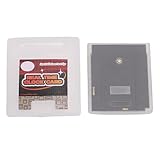
- Save & Load Game Progress Effortlessly: This rewritable flash cartridge features 8MB of storage capacity, allowing you to save your progress in classic titles. No more starting from scratch—simply load your game data onto the cartridge and pick up right where you left off, perfect for reliving your favorite retro adventures.
- Play on Multiple Handheld Consoles: Designed with broad compatibility in mind, this game cartridge works seamlessly with , Game Boy Advance, and DS systems. Whether you are using a GBC or a GBA SP, you can enjoy your game collection across different devices without needing separate cartridges for each console.
- Reliable Data Storage for Retro Gaming: The 1Mbit flash technology ensures stable and durable data retention, so your saved games and custom content remain intact even after extended periods of use. This reliable storage solution is ideal for retro gaming enthusiasts who want a dependable way to preserve their progress.
- Easy Rewriting for Multiple Games: Unlike traditional cartridges, this flash cart allows you to rewrite its contents multiple times. Simply use a compatible writer to replace the game files, enabling you to switch between different titles on a single cartridge. This flexibility saves space and cost, making it a smart choice for collectors and players.
- Compact Design & Retro Gamer Ready: The lightweight, slim cartridge body fits snugly into your handheld console without sticking out, maintaining a genuine retro feel. Ideal for gamers who enjoy playing on the go, this flash cart is a perfect addition for those nostalgic for the golden age of handheld gaming.
Describe the musical role directly, such as “short 8-bit boss-intro loop, tense ascending phrase, punchy bass, sparse noise hits, leave space for attack sound effects.” After generation, trim the arrangement to a loop and test it against your game’s sound mix.
InsMelo offers MP3 and WAV downloads. It says tracks are 100% royalty-free for commercial games, including releases on Steam, itch.io or mobile. Pricing is not stated in the supplied information, so check the vendor page before budgeting. The page does not establish Game Boy-native exports or tracker data.
Shopping ad

- Powerful Performance: Unlock the full potential of your for Gameboy with our game cartridge. This multifunctional burning card allows you to store and play multiple games on a single cassettes, ideal for retro game lovers. Enjoy your favorite classic games easily and conveniently.
- High Compatibility: Supports for Gameboy and for Color games up to 64Mbit, with support for various for MAPPER including for MBC1, for MBC2, for MBC3, for MBC5, and more.
- Automatic Backup: Simply drag and drop file management, easily transfer files via USB connection to your computer. Automatically backup game files to memory card, no manual working needed. Game files will be saved to the storage card when changing games.
- Custom Function: Customize A B functions. Supports a return to menu, easily return to the main menu with a single press, enhancing user convenience. The burning card adopts the energy saving technology to extend battery life for longer gaming experience.
- Superior Stability: Provides stable and secure storage of your valuable game data, no need to worry about data loss, giving you a professional and user experience.
4. GameAudioLab
GameAudioLab is the most useful of these options when a small project needs music, ambience and sound effects from one game-audio service. Its example is a “Retro 8-bit platformer theme with catchy melody in major key,” which is a clear Game Boy-adjacent reference.
Its stated workflow goes from prompt to WAV in seconds. A focused brief could be: “8-bit Game Boy-style cave loop, minor-key arpeggio, restrained pulse lead, low-register bass, soft noise percussion, 20-second seamless exploration cue.” Keep music requests separate from ambience or SFX requests so each generation has one purpose.
What’s actually slowing this PC down?
Pick the symptom - the matching free tool is one click away.
Shopping ad
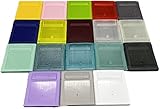
- Model for gameboy color; for gameboy classic GB
- Game Card Replacement Shell
- Made of new upgraded mold, high quality plastic
- Only guaranteed compatibility with original game cards
- package:1PCS
The Starter option is £3 one-time for 50 credits. Music and ambience generations cost 10 credits each, while SFX generations cost 5 credits. The plan states WAV download and personal and commercial use. Confirm whether the current service supplies loop metadata, stems or any tracker-friendly format; those details are not established here.
Independent reader supportYour contribution helps us test, update, and keep practical guides available for everyone.How To Prompt For A Game Boy Style
Game Boy music usually works best when the brief describes constraints rather than only naming a decade. Specify a compact loop, a small number of melodic layers, a clear pulse or wave lead, a bass pattern, noise-based percussion and the scene’s emotional role. Mention “inspired by” the sound rather than asking for a direct copy of a particular game’s composition.
Quick Recap
- Choose the scene: overworld, menu, boss, puzzle, cave or victory.
- Set the loop goal: state that it should loop cleanly and give an approximate duration only when the tool accepts one.
- Describe parts: lead waveform character, bass motion, arpeggio density and noise percussion.
- Set the mix role: instrumental background with space for dialogue and effects.
- Export the available audio or MIDI format, then verify channel count, tempo, loop points and memory limits in your own Game Boy workflow.
Rights And Consent Checks Before Release
- AI Game Music Generator describes its game music as royalty-free; Arcade Composer states royalty-free commercial use on every plan; InsMelo states 100% royalty-free commercial use; GameAudioLab states personal and commercial use. Read each platform’s current terms for attribution, redistribution and modifications.
- The supplied product information does not establish voice, cover-song or sample-clearing rules for any of these tools. If a project uses a person’s voice, a recognizable cover or third-party samples, obtain the needed consent and verify the platform’s terms before release.
- None of the supplied facts promises native Game Boy ROM, tracker or cartridge output. Treat exported WAV, MP3, OGG, stems or MIDI as inputs to your own conversion and integration process.
Product prices and availability are accurate as of the date/time indicated and are subject to change. Any price and availability information displayed on Amazon at the time of purchase will apply.




