Outdated Drivers Are Slowing You Down
One free scan finds every outdated or missing driver and matches the right update for your exact hardware.Free scan · exact hardware matchPC Slower Than It Used to Be?
A free scan shows the junk files, broken settings and background clutter dragging Windows down - then fixes them in one click.Free scan · Windows 10 & 11For an AI upbeat funk music generator, Songen is the clearer fit when you want editable loops: it lists DiscoFunk among its styles and can generate lead, chord, bass, and drum MIDI loops. Drummer Buddy is a narrower option for iPhone drum grooves; its site explicitly says it can create funk, but does not establish an upbeat setting or export workflow. Neither listing establishes a dedicated “upbeat funk” preset, so describe the groove and energy in your prompt and confirm the result by listening.
That distinction matters for developers and creators building a loop for a game, stream, prototype, or short video. Funk depends on an interlocking rhythm section: syncopated bass, crisp drums, and a chord part that leaves room for the groove. “Upbeat” adds energy and forward motion, but it does not specify tempo, instrumentation, or whether you need a full song, a seamless loop, or editable parts. Treat those as separate decisions instead of assuming a genre label will solve them.

What To Look For In Upbeat Funk Generation
Start with the deliverable. If you need to tune timing, swap notes, or adapt a loop to a project, editable MIDI parts are more useful than a finished audio render. If your immediate need is a drum bed, a drum-focused generator may be enough. A complete song arrangement is useful when you want sections and transitions, but can take extra work to reduce into a repeatable game or video loop.
Next, spell out the musical behavior. A useful prompt says what the rhythm section should do, not only what genre it should resemble. For example: “Upbeat, tight funk groove; syncopated bass feel; dry punchy drums with a steady backbeat; clipped chord stabs; bright energy; four-bar loop suitable for repeating.” This is a prompt example, not a guaranteed product command or a claim that either tool supports each instrument or parameter.
Shopping ad
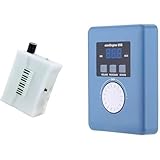
- Converts measurable surface potential into musical sound generation, enabling organic waveform expression for ambient composition, sound experiments and unique performance environments.
- Supports MIDI output to connect with synthesizers or digital workstations, expanding control over tone shaping, modulation structures and experimental sound layering.
- Responds to contact input and plant conductivity interaction, allowing dynamic trigger changes and evolving tone behavior suitable for generative audio setups and experimental music sessions.
- Supports installation work, performance atmospheres, digital audio production, looping landscapes and meditative soundscapes using plant-responsive source material.
- Portable configuration suits live rigs, production desks, sound art exhibitions, improvisational recording and signal-based sonic research.
For a more specific variation, try: “Light, playful funk for a menu screen; buoyant groove, restrained fills, no dramatic build, clean ending that can return to the first bar.” If a generator does not provide the requested controls, use the prompt as guidance and inspect the output. Neither product’s listed facts establish seamless-loop detection, key selection, exact tempo matching, or a particular mix style. Check the vendor’s current details before relying on those capabilities.
Best AI Upbeat Funk Music Generators
1. Songen — Best For Editable Funk Loops
Songen is the strongest match here for creators who want to shape a groove after generation. Its site lists DiscoFunk as a style, and its directory entry describes editable lead, chord, bass, and drum MIDI loops. It also lists song arrangement with section regeneration and piano-roll note editing, plus MIDI, lossless WAV audio, and separate-stem exports offline. Those capabilities make it a practical starting point for a funk sketch that needs adjustment before it reaches a DAW or interactive project.
Try a prompt such as “upbeat DiscoFunk loop, lively bass movement, crisp drums, short chord accents, bright and playful.” The style listing supports DiscoFunk as an option, but the specific musical ingredients in that example are creative direction, not confirmed prompt controls or guaranteed generated parts. Once a loop is available, use the listed note-editing and section-regeneration workflow to refine the parts that need a different feel. For a game loop, check that the exported material actually joins cleanly when repeated; seamless looping is not established in the available product details.
Songen is listed as freemium with a free plan, and free access has daily generation and export limits. The exact current limits and paid-plan pricing are not established here, so check Songen’s site before planning repeated exports. Its listed offline workflow is focused on Apple devices: iOS and macOS. It may suit an Apple-based creator who wants MIDI-first editing, but its supported file integrations with any particular DAW are not stated.
Do these 3 things before closing this tab:
1Repair Windows errors before they cause bigger problems2Scan for outdated or missing drivers - takes under a minute3Clear out junk files and repair common Windows errors2. Drummer Buddy — Best For Funk Drum Ideas On iPhone
Drummer Buddy is a focused choice when the missing piece is a drum groove rather than a full funk arrangement. Its site invites users to describe a feel, genre, or reference idea and says it can create grooves “from funk to trap, rock to reggae.” Its directory entry describes complete drum songs with intros, verses, drops, fills, and outros, alongside section and note editing. Controls listed there include BPM, time feel, repeats, reverb, room, and humanizing.
For an upbeat funk starting point, ask for a lively, syncopated funk drum groove with a clear backbeat and restrained fills, then shape the sections and timing with the listed editing controls. The site’s genre statement supports funk, but neither the site nor the directory facts establish a named upbeat-funk preset, specific drum samples, or a dedicated loop export format. Confirm whether the result fits your project and how to export it before building a production workflow around it.
Shopping ad

- AI song generator: turn a short text idea into a complete song
- Lyrics to song: paste your own words and hear them sung
- Vocals or instrumental – your choice for every track
- 14 genres: Pop, Hip-Hop, Lo-Fi, Rock, R&B, Jazz, EDM, Country & more
- 12 moods from happy and romantic to epic and mysterious
Drummer Buddy is listed as freemium with a free plan, and AI actions consume credits. Its listed availability is iOS, so it is an iPhone-oriented drum ideation tool rather than a broad music-production environment. Pricing and the free-plan credit amount are not established in the provided product details; check the vendor’s current information before estimating how many generations a project will need.
Independent reader supportYour contribution helps us test, update, and keep practical guides available for everyone.Quick Comparison
| Generator | Supported funk evidence | Best established workflow | Listed platform focus | Free access |
|---|---|---|---|---|
| Songen | DiscoFunk appears in its style list | Editable MIDI loops, section regeneration, piano-roll editing, MIDI/WAV/stem export offline | iOS and macOS | Free plan; daily generation and export limits |
| Drummer Buddy | Site says it creates grooves from funk and other genres | AI drum-song generation with section and note editing | iOS | Free plan; AI actions consume credits |
Choose By The Asset You Need
- Choose Songen when you want a multi-part loop you can edit as MIDI, especially if you are arranging or adapting the parts in an Apple-device workflow.
- Choose Drummer Buddy when you mainly want to sketch and edit a funk drum arrangement on iPhone.
- Check both vendors’ current details if your project depends on a specific DAW, exact tempo, key, seamless looping, a named upbeat preset, or an export format beyond those listed above. Those specifics are not established here.
A Practical Prompt-To-Project Workflow
- Define the use: Decide whether you need a drum idea, an editable multi-part loop, or a longer arrangement. Write down the target duration or repeat length for your own project; neither product’s stated facts promise a particular duration.
- Describe the groove: Use words such as “upbeat,” “funk,” “tight,” “syncopated,” or “playful,” then add only the instrument and arrangement requests that matter to your scene. Treat the wording as direction, not a list of guaranteed controls.
- Generate a first pass: Use Songen’s listed DiscoFunk style for a loop-oriented starting point, or Drummer Buddy’s prompt-based funk groove generation for a drum-focused sketch.
- Edit what the project needs: Songen lists note editing and section regeneration; Drummer Buddy lists section and note editing plus BPM and time-feel controls. Use those documented controls where appropriate, and verify any other needed control in the app.
- Check the asset in context: Listen at the intended repeat point, test it against the pace of the scene, and confirm the export imports into your toolchain. These are project checks, not product features.
- Review rights before release: The available facts do not establish commercial-use permissions or specific rules for voices, covers, or samples. Get consent for material you supply and check each platform’s terms for the intended use.
Rights And Release Checks
Before shipping music in a game, video, stream, or other commercial project, read the current terms for the service you used and confirm what they allow for your intended release. The facts available here do not state either product’s commercial-use license or detail rules for voice likenesses, covers, or samples. Obtain consent for voices or other material you contribute, and do not assume that generation itself grants rights to third-party material.
Quick Recap
Product prices and availability are accurate as of the date/time indicated and are subject to change. Any price and availability information displayed on Amazon at the time of purchase will apply.




