Recommended Free Tools
The Geeks Club is reader-supported. When you buy through links on our site, we may earn an affiliate commission. As an Amazon Associate I earn from qualifying purchases. Learn more
Field service management software for a small U.S. service business can cost anywhere from $0 to several hundred dollars per month. A solo operator may use a permanent free plan, while transparent paid options commonly land around $29–$79 per month for one-person or unlimited-user entry tiers, $60–$200 per month for published small-team bundles, and considerably more for advanced or quote-based systems.
The important number is not the lowest headline price. It is the cost of the users, jobs, documents, payment volume, text messages, integrations and workflow features your business will actually use. Free plans often cap users, monthly jobs or estimates and invoices; paying makes sense when one of those limits blocks revenue-producing work or when manual scheduling, invoicing and payment follow-up costs more than the subscription. The comparison below is listed alphabetically, not ranked, and prices and limits were checked in November 2026.

At a glance
These are published monthly prices where the vendor provides them. Quote-based products are shown as quote-based rather than assigned an invented starting price.
| Name | Best for | Key spec | Free plan / price | Checked |
|---|---|---|---|---|
| Contractor+ | Businesses that want a free start with a document cap | Freedom supports 250 leads and clients and five estimates or invoices per month | $0; Pro Team $58/month for the first two users | November 2026 |
| Housecall Pro | Teams wanting scheduling, payments, GPS and back-office tools in one bundle | Scheduling, vehicle GPS, quotes, invoices, payments, time tracking, reporting and accounting features | Current public price should be confirmed through the signup flow | November 2026 |
| Jobber | Businesses comparing a guided trial with team-size configurations | Grow shown at $199/month for one user without commitment and $299/month for five users without commitment | Free trial; Grow from $149/month billed annually for one user | November 2026 |
| Kickserv | Small crews that want published bundles with several included users | Start includes five users; Run includes ten; Scale includes twenty | 30-day trial; Start $60/month for five users | November 2026 |
| ServiceM8 | Solo operators and small trade contractors priced by monthly job volume | Free plan supports one user and 30 jobs per month; paid tiers include unlimited users | $0; paid plans from $29/month | November 2026 |
| ServiceTitan | Businesses needing a broad, configurable field-service platform | Per-technician, quote-based packages covering dispatch, payroll, reporting, memberships and more | Request Pricing | November 2026 |
| Workiz | Teams that need a feature ladder reaching inventory, service plans or API access | Standard, Pro and Ultimate add automations, scheduling, proposals, inventory, APIs and franchise features | Quote-based pricing | November 2026 |
Prices checked November 2026.
Prices are monthly unless stated otherwise. Annual billing, one-year commitments, extra users, payment processing, SMS, add-ons and implementation can change the total.
Shopping ad
What does field service management software usually cost?
For a small service business, the realistic range is broad because vendors charge according to different units. Some charge per user or technician, some bundle a fixed number of users, some meter monthly jobs, and some limit documents such as estimates and invoices. A free plan can therefore be less economical than a $60 bundle once a second technician or helper needs access.
- $0: Permanent free plans are available, but they usually limit users, jobs or documents. ServiceM8 limits its free tier to one user and 30 jobs per month, while Contractor+ limits its free tier to five estimates or invoices per month.
- About $29–$79 per month: This is the range for transparent entry-level paid plans in the published pricing reviewed here. ServiceM8 lists Starter at $29/month and Growing at $79/month.
- About $60–$200 per month: Published small-team bundles fall in this range. Kickserv lists Start at $60/month for five users, Run at $119/month for ten users and Scale at $199/month for twenty users.
- $200 and higher: Larger team configurations and advanced tiers can quickly exceed the entry-level range. Jobber shows five-user Grow pricing from $229/month when billed annually, while its five-user Plus tier is shown at $399/month when billed annually.
- Quote-based pricing: Some platforms do not publish a comparable monthly figure. ServiceTitan uses per-technician pricing with a request-for-pricing model, and Workiz presents a feature ladder that requires a pricing request.
Those figures are subscription prices, not the full operating cost. A business may also need mobile hardware, payment processing, SMS charges, extra seats, onboarding, phone or AI features, accounting integrations, data migration or overage fees. An iPad or other field tablet is separate from the software subscription, even when the technician workflow depends on mobile job cards, schedules, quotes, invoices and payments.
How should a small service business compare FSM prices?
Compare the cost of completing your actual monthly workflow, not the advertised entry price. Start with the five inputs below.
Do these 3 things before closing this tab:
1Scan for outdated or missing drivers - takes under a minute2Repair Windows errors before they cause bigger problems3Fix the driver behind crashes, sound loss and screen glitches- Count people who need logins. Include owners, office staff, dispatchers, technicians, subcontractors and temporary workers. A one-user free plan is not equivalent to a five-user bundle.
- Count work volume by the unit the vendor charges. For job-based plans, count new jobs, quotes and work orders—not only jobs that have been completed. For document-based plans, count the estimates and invoices you issue each month.
- Separate billing commitments. Compare month-to-month pricing, annual billing and one-year commitments in separate columns. A lower annual price may be useful only if the business can tolerate the commitment and the renewal terms.
- Match the workflow to the feature tier. Scheduling, quotes, invoices and payments are basic workflow functions. Dispatch maps, GPS check-ins, job costing, forms, service plans, inventory, payroll, API access and advanced reporting may require a higher tier.
- Request variable charges in writing. Ask about extra users, SMS, payment processing, phone features, AI features, add-ons, onboarding, overage rules, cancellation and data export. Compare the annual total rather than only the monthly subscription.
During a trial or before upgrading, record how many jobs were completed, quotes were sent, invoices were paid, staff logins were needed and integrations were actually used. That usage snapshot is more useful than a long feature list.
1. Contractor+: who it is for
Contractor+ suits a small contractor that wants to start at $0 and can work within a strict document ceiling, or a growing team that wants CRM, job costing and profitability tools. Its free Freedom plan supports up to 250 leads and clients and allows five estimates or invoices per month.
The free plan is permanent rather than a short evaluation window. It can be practical for a very low-volume operator, but the fifth document is a hard upgrade trigger for a business sending regular proposals or billing multiple customers. A business can have plenty of contacts and still outgrow the plan quickly if it issues more than five estimates or invoices in a month.
Paid plans and prices:
- Freedom: $0/month, up to 250 leads and clients, five estimates or invoices per month.
- Pro Team: $58/month for the first two users, plus $20/month for each additional user. It adds advanced CRM, automated job costing, profitability tracking, phone, chats, payments, a client portal, QuickBooks Online, Zapier and an API.
- Max: $500/month with unlimited users. It adds additional AI, voice, local-marketing and priority-support inclusions.
Upgrade to Pro Team when document limits or manual job-cost tracking are interfering with sales and billing. The extra-user charge matters for a five-person crew: the first two users are included, while three additional users would add $60/month under the published marginal-seat price, before any other charges. Max is aimed at businesses that need unlimited users and its additional service bundle, not simply businesses looking for a slightly larger document allowance. See the Contractor+ pricing page for the published plan structure.
2. Housecall Pro: who it is for
Housecall Pro suits a service business looking for a broad operating bundle that combines office administration with technician-facing work. Its published feature set includes scheduling, vehicle GPS, customer contact, quotes and proposals, a mobile app, payments, invoices, expense cards, financing, time tracking, reporting, payroll and accounting functions.
Shopping ad
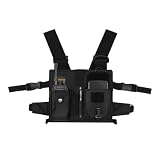
- Hands-Free Productivity: Keep your tablet within easy reach while keeping both hands free for work. Ideal for field service, warehouse operations, inspections, construction, maintenance, and other indoor or outdoor tasks. Designed to fit tablets up to 10.2 inches.
- Secure Tablet Protection: Internal retention straps, elastic side panels, and padded construction help keep your tablet securely in place while walking or working. Compatible with many iPad and Samsung tablets up to 10.2 inches for dependable everyday use.
- Comfortable Adjustable Fit: Lightweight ergonomic design features adjustable shoulder and waist straps for a personalized fit. Comfortable enough for extended wear while standing, walking, or moving between job sites, helping reduce arm fatigue throughout the day.
- Durable Outdoor Storage: Built with durable materials for demanding work environments. Two front compartments, expandable side pouches, and a convenient glove hook keep radios, phones, pens, paperwork, and other tools organized and easily accessible whether working indoors or outdoors.
- Easy to Choose and Use: Fits most tablets up to 10.2 inches. Measure your tablet before ordering to ensure the best fit. Customers appreciate the secure design, comfortable wear, adjustable straps, and convenient hands-free access that help improve productivity during daily tasks.
Housecall Pro does not provide a comparable public starting figure in the pricing view used for this comparison. Treat it as a product that requires a current regional price check through the signup flow rather than assuming it fits the $29–$79 entry-level range. Do not count any signup offer as a permanent free plan unless the current terms explicitly say so.
Free access and paid pricing: A permanent free operating tier, numeric free-plan limit and complete public price table are not available as a reliable baseline here. Confirm whether a current trial is offered, how long it lasts, which features it includes, the number of users covered and what the subscription becomes after the trial.
The main cost question is whether the bundle replaces enough separate tools and manual work to justify its quoted price. Ask for the price of the required number of technicians and office users, payment-related charges, text-message costs, payroll or accounting integrations, onboarding and cancellation terms. The Housecall Pro pricing and features page is the appropriate starting point for that current regional check.
What’s actually slowing this PC down?
Pick the symptom - the matching free tool is one click away.
3. Jobber: who it is for
Jobber suits a business that wants to begin with a no-credit-card trial and then select a configuration based on team size and commitment. Its pricing page presents team-size choices from one person through teams of 16 or more, making seat count central to the cost comparison.
Trial and pricing: Jobber advertises a free trial with no credit card required and says customers can choose a plan later. The trial should not be confused with a permanent free operating tier. The page also advertises savings of up to 25% with annual billing.
The displayed Grow tier provides these published examples:
- One user: $199/month without commitment, $169/month with a one-year commitment or $149/month billed annually.
- Five users: $299/month without commitment, $259/month with a one-year commitment or $229/month billed annually.
- Plus for five included users: $499/month without commitment, $439/month with a one-year commitment or $399/month billed annually.
These prices show why a solo headline price and a five-user operating cost should be compared separately. A five-person crew should identify whether every employee needs a full seat, whether the included-user count covers office staff and technicians, and whether the lower annual price is worth the commitment. A solo operator should use the trial to count actual quotes, invoices, payments and staff access needs before selecting the displayed Core or Grow configuration. Check the current Jobber pricing page immediately before purchase because the displayed prices are subject to change.
The Tool Desk
Outbyte PC Repair FREERepair Windows errors before they cause bigger problemsFix Now →Outbyte Driver Updater FREEFix the driver behind crashes, sound loss and screen glitchesFind Drivers →4. Kickserv: who it is for
Kickserv suits a small crew that wants a clearly published user bundle instead of a one-user price that rises with every technician. Its Start, Run and Scale plans are designed around five, ten and twenty users respectively.
Shopping ad

- Hands-Free Productivity: Keep your tablet accessible while keeping both hands free for work. Ideal for inspections, warehouse tasks, field service, construction, inventory management, and other indoor or outdoor jobs. The harness securely holds tablets up to 12.9 inches, including compatible iPad and Samsung tablets.
- Secure Tablet Protection: Elastic side straps, internal retention straps, and padded construction help keep your device stable during movement. Designed to hold your tablet securely while walking, climbing, or working without frequent repositioning.
- Comfortable Adjustable Fit: Lightweight ergonomic design features fully adjustable shoulder and waist straps for a customized fit. Built for comfortable extended wear while standing, walking, or moving between job sites, helping reduce arm fatigue during long workdays.
- Built for Outdoor Work: Constructed from durable materials with protective padding to withstand demanding work environments. Multiple storage compartments and expandable side pouches keep radios, phones, gloves, pens, and other essentials organized and within easy reach.
- Easy Device Compatibility: Fits most tablets up to 12.9 inches. Measure your tablet before ordering to ensure the best fit. Customers appreciate the convenient hands-free design, secure tablet retention, adjustable fit, and practical storage that improve productivity throughout the day.
Kickserv offers a 30-day free trial. That is an evaluation period, not a permanent $0 operating plan. The vendor also says annual subscriptions save 20%, so compare the monthly rate with the annual commitment before treating the discount as part of the ongoing monthly budget.
Paid plans and prices:
- Start: $60/month for five users. It includes an embeddable contact form, automated email and text reminders, more than 20 business reports, time tracking, expense tracking and QuickBooks Online integration.
- Run: $119/month for ten users. It adds dispatch mapping, GPS check-ins, custom data fields and custom reports.
- Scale: $199/month for twenty users. It adds custom templates and reviews.
Kickserv also describes a 5% Kickback discount when a plan meets a stated monthly online-payment minimum. That condition is not a universal discount; it depends on payment volume and should be included in the total-cost calculation only if the business qualifies. Start can suit a crew that needs several logins but does not yet need GPS check-ins or custom reporting. Run is the relevant comparison when dispatch visibility and field check-ins are revenue or accountability requirements. Review the Kickserv pricing page for the current annual and payment conditions.
5. ServiceM8: who it is for
ServiceM8 suits solo operators and small trade contractors that prefer pricing tied to monthly job volume rather than a per-user charge. It is designed for businesses ranging from sole traders to teams of about 20 staff and is optimized for Apple devices; Android Lite supports technicians and temporary workers.
Free tools Windows power users keep installed
One-click scans. No signup required.
ServiceM8 is unusual in offering both a permanent free tier and a sequence of job-volume paid tiers. The free plan includes job cards, scheduling, quoting, invoicing, client history, online bookings, card payments, automation, accounting integrations, reporting and AI helpers.
Plans and prices:
- Free: $0/month for one user and 30 jobs per month.
- Starter: $29/month for unlimited users and 50 jobs per month.
- Growing: $79/month for unlimited users and 150 jobs per month.
- Premium: $149/month for unlimited users and 500 jobs per month.
- Premium Plus: $349/month for unlimited users and 1,500-plus jobs per month.
The main upgrade trigger is the next job, not the next employee. A solo operator issuing fewer than 30 new jobs per month can test whether one login is sufficient on Free. The 31st job makes Starter the first published paid step; a business with several technicians may still find Starter or Growing attractive because the paid tiers allow unlimited users, provided the monthly job allowance is sufficient.
Count new quotes and work orders when assessing job volume, not merely completed jobs. Also confirm the device fit before committing: the Apple-optimized workflow and Android Lite support are not the same experience. The current ServiceM8 U.S. plans page contains the free-plan and job-volume structure.
6. ServiceTitan: who it is for
ServiceTitan suits a service business that needs a configurable platform with a broad operational feature set and is prepared to negotiate a per-technician package. It lists Starter, Essentials and The Works packages with combinations of dispatching, scheduling, call booking, invoicing, pricebook, mobile estimates, payroll, reporting, commissions and memberships.
Outdated Drivers Are Slowing You Down
One free scan finds every outdated or missing driver and matches the right update for your exact hardware.Free scan · exact hardware matchPC Slower Than It Used to Be?
A free scan shows the junk files, broken settings and background clutter dragging Windows down - then fixes them in one click.Free scan · Windows 10 & 11Pricing: ServiceTitan uses a request-pricing model and describes its pricing as per technician. No defensible monthly figure should be substituted for that quote. A quote-based model can make sense when the business needs a deep workflow and wants a package built around its technician count, but it makes a written total-cost proposal essential before comparison with self-serve plans.
Shopping ad
- Hands-Free Productivity: Keep your tablet securely positioned while leaving both hands available for work. Ideal for inspections, field service, warehouses, construction, inventory management, and other tasks that require frequent tablet access.
- Secure Fit for Tablets: Designed to hold tablets from 9.7 inches up to 10.2 inches, including compatible iPad and Samsung models. Elastic side straps and internal retention straps help keep your device securely in place. Tablets larger than 10.2 inches are not recommended.
- Comfortable Adjustable Design: Lightweight construction and fully adjustable shoulder straps provide a customized fit for extended wear. The ergonomic design helps reduce arm fatigue while allowing the tablet to swing downward for convenient viewing when not in use.
- Built for Outdoor Work: Durable materials and padded tablet protection make this harness suitable for indoor and outdoor job sites. High-visibility accents improve visibility, while multiple storage pockets hold radios, phones, pens, gloves, and other essential tools.
- Easy to Use Every Day: Simply insert your compatible tablet, secure it with the elastic straps, adjust the harness for a comfortable fit, and you're ready to work. Customers appreciate the convenient hands-free design, secure tablet retention, and practical storage for everyday professional use.
Ask for the number of included technicians, the treatment of office users and subcontractors, implementation or onboarding charges, contract length, renewal terms, payment and SMS fees, integrations, data migration and export rights. Request the annual total as well as the monthly equivalent. Also ask which features in the selected package cover payroll, memberships, commissions and reporting rather than assuming every listed capability is included in every tier. Start with the ServiceTitan pricing page when requesting a dated proposal.
7. Workiz: who it is for
Workiz suits a growing field-service operation that wants to move from basic scheduling and invoicing toward automation, performance pay, inventory, service plans, proposals, checklists or API access. Its tiers form a feature ladder rather than a transparent monthly price comparison.
Pricing: Workiz requires a pricing request. Its Standard tier lists scheduling, invoices, jobs, estimates, five automations, online payments, service areas, reports, client management, custom fields, subcontractor management and QuickBooks integration. Pro adds performance pay, ten automations, Genius leads, Genius scheduling and custom reports. Ultimate adds service plans, 30 automations, sales proposals, inventory, flat-rate pricing, checklists, multi-day jobs, franchise management, an open API, equipment tracking and purchase orders.
Quick wins for a faster PC:
Fix the driver behind crashes, sound loss and screen glitchesFind Drivers →Clear out junk files and repair common Windows errorsFree Scan →No reliable free-plan price or trial limit should be assumed for Workiz from this feature ladder. Ask for the cost at your technician and office-user count, what happens when automation or user needs expand, and whether inventory, purchase orders, service plans and API access are included or add-ons. A business should request the same written cost elements from Workiz as from any quote-based platform: annual total, implementation, payment fees, SMS, renewal, cancellation and data export. The Workiz pricing and plans page outlines the feature tiers.
Independent reader supportYour contribution helps us test, update, and keep practical guides available for everyone.Which FSM pricing model fits a one-person business?
A one-person business should begin with the unit that matches its constraint. If the business has fewer than 30 new jobs per month and one login is enough, ServiceM8 Free is the clearest $0 starting point. If the business has more contacts but issues no more than five estimates or invoices per month, Contractor+ Freedom may fit better.
Paying $29/month for ServiceM8 Starter makes sense when job volume exceeds 30, when multiple users are needed or when the free limit interrupts scheduling and billing. Contractor+ Pro Team makes sense when the business needs advanced CRM, automated job costing, profitability tracking, a client portal or integrations. A solo operator considering Jobber should use its no-credit-card trial and compare the eventual team-size configuration and annual commitment rather than treating the trial as a free plan.
What will five technicians cost?
For five technicians, published bundle pricing can be more important than a low solo rate. Kickserv Start is listed at $60/month for five users. Jobber displays a five-user Grow configuration at $299/month without commitment, $259/month with a one-year commitment and $229/month billed annually; its five-user Plus configuration is shown at $499/month without commitment, $439/month with a one-year commitment and $399/month billed annually.
That is not an apples-to-apples feature comparison. Kickserv Start, Jobber Grow and Jobber Plus include different workflow depths, and office staff may also need access. Compare the exact roles included, dispatch requirements, GPS, forms, reports, payment features and annual commitment. For quote-based products, request pricing for five technicians plus the office users who will schedule, invoice or manage customers.
Shopping ad

- COMPATIBILITY - Designed to be compatible with Apple NEW Apple iPad Air 3 (2019), iPad Pro 10.5 (2017) making it the perfect choice for those looking to keep their device protected without sacrificing functionality.This screen protector is NOT compatible with the iPad Air 2 or other iPad Pro models
- ULTIMATE PROTECTION - Provide ultimate protection for your Apple NEW Apple iPad Air 3 (2019), iPad Pro 10.5 (2017) from scratches, drops, and other types of damage.
- CRYSTAL CLEAR - Offers high definition clarity, allowing you to enjoy a crystal-clear viewing experience on your iPad Pro.
- EASY INSTALLATION - Easy to install and comes with a complete installation kit, making it hassle-free to apply to your iPad
- APPLE PENCIL AND FACE ID COMPATIBLE - The ultra-thin design ensures compatibility with the Apple Pencil and Face ID, allowing you to seamlessly use all their features without any interference.
What hidden costs should be included in the budget?
The subscription is only one line of the operating budget. Before signing, ask each vendor for these items in writing:
- Additional users: Contractor+ lists $20/month for each user beyond the first two on Pro Team. Other products may bundle users or price per technician.
- Job, document or automation overages: ServiceM8 meters jobs, Contractor+ meters estimates and invoices, and Workiz separates automation counts by tier.
- Annual billing and commitments: Jobber displays different no-commitment, one-year-commitment and annual prices. Kickserv says annual subscriptions save 20%.
- Payment-related charges: Payment processing, online-payment minimums and financing can affect the effective cost. Kickserv’s 5% Kickback condition depends on a stated monthly online-payment minimum.
- SMS, phone and AI: Text reminders, phone tools and AI features may have usage or plan conditions. Verify whether they are included or billed separately.
- Implementation and renewal: Quote-based systems may involve onboarding, contract and renewal terms that are not visible in a monthly headline price.
- Hardware and connectivity: A technician may need a supported phone or tablet, mobile data and charging equipment. Those costs are separate from the software subscription.
When should a business upgrade from a free plan?
Upgrade when a free limit blocks work that produces revenue. That could be the second required login, the 31st ServiceM8 job, the sixth Contractor+ estimate or invoice, or a missing workflow such as dispatch mapping, GPS check-ins, job costing or service plans.
Upgrade also when the subscription removes a measurable recurring burden. Repeated scheduling calls, duplicate invoice entry, untracked expenses, delayed payment collection and manual customer updates are useful signals. Do not upgrade solely because a higher tier has a longer feature list. First identify which feature will replace which manual task and how often that task occurs.
Before paying, ask for the annual total, implementation charges, payment and SMS fees, cancellation terms and data-export method. For a trial, track completed jobs, quotes sent, invoices paid, staff logins and integrations actually used. That evidence lets the business compare the subscription with the cost of staying manual.
How were these products selected?
The shortlist covers published free plans, transparent paid plans, small-team bundles and quote-based systems relevant to small U.S. service businesses. The comparison uses team-size economics, monthly job or document limits, annual-versus-monthly billing, workflow depth, variable charges and the difference between a free operating plan and a temporary trial. The seven products are listed alphabetically, not ranked.
Frequently Asked Questions
Frequently Asked Questions
Can two technicians share one free FSM login?
They may be able to share credentials technically, but that can undermine assignment history, accountability and staff access controls. If two people need independent schedules, job updates or payment activity, budget for a plan that explicitly supports multiple users rather than treating one shared login as a true two-person setup.
Does a monthly job limit count only completed jobs?
Not necessarily. For budgeting, count new job records, quotes and work orders created during the month unless the vendor defines the unit differently. A business can exceed a job allowance before those jobs are completed, so its estimate should include incoming work rather than only finished appointments.
What should I ask a quote-based FSM vendor before signing?
Ask for a dated proposal showing technician seats, office users, included modules, implementation, payment and messaging fees, contract length, renewal terms, cancellation rights and data export. Also ask what happens when the team adds technicians or exceeds included automation, job or payment volume.
Do field service software plans include a tablet for technicians?
The subscription normally covers the application, not the technician’s hardware, mobile data or accessories. Treat an iPad or another supported tablet as a separate enabling purchase and confirm device compatibility, especially when the vendor’s mobile support differs between Apple and Android devices.
Quick Recap
Product prices and availability are accurate as of the date/time indicated and are subject to change. Any price and availability information displayed on Amazon at the time of purchase will apply.

