The Tool Desk
Outbyte PC Repair FREERepair Windows errors before they cause bigger problemsFix Now →Outbyte Driver Updater FREEFix the driver behind crashes, sound loss and screen glitchesFind Drivers →The Geeks Club is reader-supported. When you buy through links on our site, we may earn an affiliate commission. As an Amazon Associate I earn from qualifying purchases. Learn more
Video editing software for social media can cost $0, a recurring subscription, or a larger one-time investment when you add a desktop edition or dedicated controller. Occasional creators can stay on a free plan; a frequent solo creator should budget for a paid tier when captions, premium assets, higher exports, or cloud limits slow production; teams must also price seats, storage and review tools. A contextual 2026 estimate puts serious multi-video workflows at about $35 per month or more, but there is no authoritative universal average. Check the live vendor checkout price, taxes and renewal terms before buying.
The comparison below is alphabetical, not ranked. Prices and feature availability can vary by country, device and billing term, so treat dynamic checkout pages as the final authority.
At a glance
| Name | Best for | Key spec | Free plan / price | Platforms | Checked |
|---|---|---|---|---|---|
| Canva | Marketers combining short videos with branded graphics | Templates, video editing, recording, conversion and AI video tools | Free tier; paid pricing is dynamic | Browser and mobile apps | November 2026 |
| CapCut | Fast vertical clips and phone-first publishing | Timeline editing, trimming, auto captions, conversion and generation | Free entry point; paid pricing is dynamic | Mobile, browser and desktop availability varies | November 2026 |
| DaVinci Resolve | Desktop creators who need editing, color and audio depth | Editing, color, Fusion effects, Fairlight audio and collaboration ecosystem | Free application; Studio and hardware prices vary | Windows, macOS and Linux editions; verify current support | November 2026 |
| iMovie | Apple users making occasional personal clips | Consumer desktop and mobile timeline editing | Free | macOS, iPhone and iPad | November 2026 |
| OpenShot | Users wanting a no-subscription desktop editor | Open-source, timeline-based editing | Free | Windows, macOS and Linux | November 2026 |
Details checked November 2026.
CapCut’s pricing page, Canva’s plan comparison and Blackmagic Design’s Resolve product page can change plan names, limits and prices. Recheck them at checkout.
Free tools Windows power users keep installed
One-click scans. No signup required.
What should you budget for social video editing?
Your workflow matters more than the number of followers. Three realistic budgets cover most buyers:
Shopping ad

- Small and Portable with Built-In Battery
- Built-In Search Dial
- Keyboard Shortcuts Match Edit Functions
- Bluetooth or USB Connectivity
- Bundle Includes DaVinci Resolve 17 Studio (Activation Card)
- Occasional clips: $0. A free editor is adequate when you publish a few simple videos, can supply your own music and graphics, and do not need shared projects or premium templates. The cost is mainly your time and storage.
- Frequent solo creator: a subscription, often around $35 per month or more for a broad professional workflow. This contextual estimate from CreativeBloq is not a universal vendor price. Paying can make sense when automatic captions, reusable brand templates, background removal, cloud projects or faster repeatable exports save several hours each month.
- Team or client editor: subscription plus seats and services. Budget for each user, review links, cloud storage, stock media, fonts, music licenses and AI-credit quotas. A seemingly inexpensive editor can cost more once several collaborators and asset libraries are included.
For a 12-month comparison, record the exact monthly amount, annual-prepaid amount, taxes, seat count, add-ons and renewal price. Do not multiply an introductory price by 12 without checking how the second year is billed.
Which costs do free plans leave out?
“Free” usually means the editor itself has no charge, not that every publishing requirement is included. Before choosing, make a checklist for:
- Watermarks and export controls: confirm whether branding appears on the final file and whether 1080p, 4K, frame-rate or project-length limits apply.
- Captions and automation: check monthly transcription minutes, language coverage, translation, beat timing, auto reframing and background removal quotas.
- Templates and media: premium templates, stock footage, music, fonts and sound effects may be locked or licensed only for certain uses.
- Cloud storage: a small allowance can force downloads, duplicate files or an additional storage subscription.
- Collaboration: review links, comments, version history, shared brand kits and permission controls may require paid seats.
- Portability: find out whether you can export standard media, XML or EDL project data if you cancel. A rendered MP4 is not the same as an editable project.
How should you compare monthly, annual and one-time pricing?
Monthly billing costs more over a year but is easier to stop when your posting schedule changes. Annual-paid-monthly plans can reduce the apparent monthly rate while still committing you to a term; annual-prepaid plans may be harder to recover if you stop publishing. A one-time desktop license avoids recurring software fees but may exclude future major upgrades, mobile access, cloud collaboration or premium content.
PC Slower Than It Used to Be?
A free scan shows the junk files, broken settings and background clutter dragging Windows down - then fixes them in one click.Free scan · Windows 10 & 11Crashes, No Sound, or Screen Glitches?
Random freezes, missing sound and display glitches usually trace back to one bad driver. Find and replace yours safely.Free scan · under a minuteAlways ask what happens on cancellation. Some services let you keep exported files but restrict cloud projects, brand assets or premium templates immediately. Others continue access until the paid period ends. Save local copies of source footage, captions and project files before ending a subscription.
1. Canva: who it is for
Canva suits a marketer or small business that creates videos alongside social posts, thumbnails, presentations and other branded graphics. Its official pricing page groups social and video functions such as trimming, recording, conversion and AI video tools within a broader design subscription.
The free tier can cover simple edits and basic templates. Confirm at checkout whether your chosen template, stock clip, music track, font, AI feature and export resolution are included. The paid tiers are dynamic by country and billing term; use the live page rather than relying on a remembered monthly figure.
Upgrade when the value is the whole design system: shared brand assets, premium media, higher limits, team permissions and repeatable templates. If you only need a frame-accurate timeline for a few clips, paying for a broad design library may not be economical. Check how many people need seats and whether AI usage has a separate allowance.
2. CapCut: who it is for
CapCut is aimed at rapid social production, particularly vertical clips made from a phone or short-form template. Its pricing page lists timeline editing, trimming, auto captions, conversion and generation tools, but plan names and prices can vary by market.
The free entry point is useful for casual clips. Before publishing client or commercial work, verify watermark behavior, export resolution, caption limits, premium effects, music rights, AI quotas and cloud-storage limits. A feature visible in the editor may still be restricted by a plan or by your region.
Upgrade when premium templates, automation or larger AI allowances remove repetitive work every week. A phone-first creator should also confirm that the same projects and assets are available on the desktop or browser version they intend to use. Keep local originals because cloud access and premium assets can change after cancellation.
Shopping ad
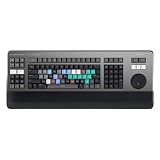
- The DaVinci Resolve Editor Keyboard is a full-size editing keyboard based on the traditional QWERTY layout, featuring premium full-metal design; Metal shaved search dial with clutch and key for editing, trim, and time code input It can also be placed flat on a cutout shaped desk!
- Integrated search dial built right into the keyboard
- Designed for professional editors who need to work faster and turn around work quickly
- Provides an alternative way to edit that is much faster than a mouse because you can use both hands at the same time
3. DaVinci Resolve: who it is for
DaVinci Resolve is suited to a desktop creator who wants a serious timeline and room to grow into color, compositing and audio. Blackmagic Design describes an ecosystem spanning editing, color, Fusion effects, Fairlight audio, collaboration, Studio software, keyboards and control panels.
The free application can be a $0 starting point for social videos, but its learning curve and desktop requirements are greater than those of template-first tools. The paid Studio edition adds capabilities beyond the free application; the current price should be checked on the vendor’s page for your country and version. Do not combine the software price with optional hardware: a dedicated editing controller is a separate purchase.
Resolve makes sense when you need frame-accurate trimming, layered sound, detailed color work, high-resolution media or a project that may later become a longer production. It may be overkill for a creator who only cuts talking-head clips, adds captions and posts from a phone. Verify GPU, operating-system and codec requirements before budgeting.
4. iMovie: who it is for
iMovie is a free option for people already using Apple devices who make occasional reels, family videos or simple channel clips. It provides a consumer timeline on macOS, iPhone and iPad without a recurring software bill.
Its zero-dollar price does not cover optional music licenses, external storage, stock footage or the time needed to create captions and multiple aspect-ratio versions. Confirm current export controls and compatibility with the social platform you use, especially when moving projects between a phone, tablet and Mac.
Choose it when your footage is already in the Apple ecosystem and your edits are straightforward. Move to a paid or deeper desktop editor when you need shared review, extensive automation, advanced color and audio tools, or a workflow that must be reproduced for many clients.
5. OpenShot: who it is for
OpenShot is a free, open-source desktop editor for users who want to avoid subscriptions. It is available for Windows, macOS and Linux and provides a conventional timeline for cutting clips, arranging tracks and exporting social files.
There is no paid plan to unlock, so budget instead for storage, music and graphics you supply yourself. Check the current release’s export presets and the codecs supported by your operating system before committing a production workflow. Free software can still incur maintenance costs if you need to solve compatibility issues or create captions manually.
OpenShot fits a hobbyist or technically comfortable creator with modest automation needs. A subscription-based social editor may be worth paying for when templates, automatic captions, cloud collaboration or direct publishing save more time than the monthly fee.
Quick wins for a faster PC:
Clear out junk files and repair common Windows errorsFree Scan →Fix the driver behind crashes, sound loss and screen glitchesFind Drivers →Repair Windows errors before they cause bigger problemsFix Now →How do you calculate the real 12-month cost?
- Write down the workflow: number of videos per month, average length, aspect ratios, caption languages and whether you publish from phone, browser or desktop.
- Price the base plan: capture free, monthly, annual-paid-monthly and annual-prepaid options separately. Record the date checked as November 2026.
- Add people and storage: count editors, reviewers, cloud capacity, brand libraries and project-history requirements.
- Add assets and automation: include stock media, music rights, fonts, AI credits, transcription minutes and translation.
- Model renewal: calculate year two at the normal renewal price, not an introductory promotion. Include taxes and currency conversion.
- Check the exit: export editable projects and source media, then read the cancellation and retention terms before paying annually.
For context, CreativeBloq reported a $35-per-month-or-higher estimate for creators producing multiple social videos each week. Use that only as a budgeting signal; your actual cost depends on the plan, country, seats and add-ons.
Shopping ad
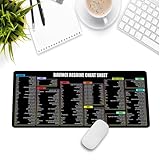
- Extra Large & Comfortable: Measuring 31.5 x 11.8 inches with a 3mm thickness, this XL mouse pad offers ample space for your mouse, keyboard, and more - ensuring comfort and reducing noise.
- Smooth & Precise Control: Enjoy effortless mouse movement with the ultra-smooth surface, perfect for both gaming and office work.
- Non-Slip Rubber Base: The anti-slip rubber base keeps the pad securely in place during intense gaming or work sessions.
- Durable & Stylish Design: Invisible stitching prevents edge wear while maintaining a sleek look, extending the pad’s lifespan.
- Waterproof & Easy to Clean: The water-resistant coating allows for quick cleaning—spills and stains wipe away easily.
When does paying save money?
Paying is rational when the same task recurs often enough that automation or reusable assets repay the fee. For example, a caption workflow that saves two hours per week can matter more than a small monthly price difference. A team should compare the cost of review delays and duplicated files with the cost of shared projects and permissions.
Do not pay solely for a longer feature list. If a free editor exports the required resolution without a watermark, supports your device and preserves your project files, a subscription may add little. Conversely, a low-cost plan can become expensive when it limits captions, hides commercial music rights or requires several separate seats.
How do hardware and accessories change the budget?
A desktop editor can become a hardware purchase as well as a software purchase. Resolve’s ecosystem includes dedicated keyboards and control panels; a creator who trims footage for hours may value physical controls, but the accessory is optional and priced separately from the application. Confirm current stock, seller, compatibility and warranty before adding one to a budget.
Also account for a capable computer, fast storage, backup drives, microphones and lighting. These are workflow costs rather than software-plan prices, but they can exceed a year of subscriptions for a new creator.
How to choose without overpaying
- Choose a free tool first if you publish infrequently and can accept manual captions and self-supplied assets.
- Choose a social-focused subscription when speed, templates and automatic captions matter more than cinematic finishing.
- Choose a broad design platform when videos must match a library of posts, presentations and brand assets.
- Choose a deep desktop editor when you need precise editing, color, audio, compositing or client handoff.
- Choose a no-subscription desktop editor when predictable ownership matters and you can handle more manual work.
Before checkout, export a short test project using your intended resolution and caption style, review the license for music and stock content, and save a local copy of the project. Confirm the exact renewal date and cancellation path in your account.
Frequently Asked Questions
Can I make social media videos without paying for software?
Yes. Free editors can handle cuts, basic transitions and exports, but you may supply your own music and graphics and create captions manually. Confirm watermark, resolution, storage and commercial-use rules before publishing.
Is a yearly video-editing subscription cheaper than paying monthly?
It can reduce the effective monthly rate, but annual plans may commit you for the full term. Compare the 12-month total, taxes, renewal price and cancellation policy rather than the advertised monthly equivalent.
What’s actually slowing this PC down?
Pick the symptom - the matching free tool is one click away.
What should a freelancer include in a video-editing quote?
Include software seats, cloud storage, stock and music licensing, caption or translation usage, revisions and backup time. State whether the client receives editable project files or only rendered videos.
How can I avoid losing projects when I cancel?
Export final videos and editable project data, download source media and captions, and copy brand assets you are licensed to retain. Check how long the service keeps cloud projects after cancellation before ending the plan.
Quick Recap
Product prices and availability are accurate as of the date/time indicated and are subject to change. Any price and availability information displayed on Amazon at the time of purchase will apply.

