Recommended Free Tools
The Geeks Club is reader-supported. When you buy through links on our site, we may earn an affiliate commission. As an Amazon Associate I earn from qualifying purchases. Learn more
Choosing a VPN for streaming is a compatibility check, not a permanent search for one universal winner. Start with the exact service and catalogue country you need, then verify that a provider has a usable app or router path for every playback device, steady performance on your network, credible privacy controls, enough simultaneous connections and a refund period long enough to test the real setup. Paying usually makes sense when you need reliable target-country servers, more data or streaming-capable servers than a free tier provides; a free plan is useful for checking the app and basic connection behavior, but it may exclude streaming, limit locations or impose data caps.
A VPN encrypts traffic between your device and its server and replaces your visible IP address with the server’s IP, which is why a streaming service may see a different apparent location. Services can identify and block shared VPN address ranges, however, so no provider can promise permanent access to every catalogue. Use a refund-eligible purchase, test your own service, country, device and network, and follow the streaming service’s terms and applicable law.
At a glance
The options below are listed alphabetically, not ranked. Availability, server inventories and prices can change by country, billing term, app store and date.
Quick wins for a faster PC:
Repair Windows errors before they cause bigger problemsFix Now →Scan for outdated or missing drivers - takes under a minuteDriver Scan →Clear out junk files and repair common Windows errorsFree Scan →| Name | Best for | Key spec | Free plan / price | Checked |
|---|---|---|---|---|
| ExpressVPN | Households wanting a straightforward paid setup and a long refund window | 105 countries in a May 2026 comparison; 14 devices in that snapshot; the displayed Basic offer shows 10 simultaneous devices | No permanent free tier cited; 30-day money-back guarantee; example 28-month term equivalent $2.99/month, $83.72 paid upfront | November 2026 |
| Proton VPN | People who want a free privacy tier for non-streaming use or a paid streaming tier | 145* countries and 10* devices on paid plans in a May 2026 comparison | Free tier unavailable for streaming in TechRadar’s table; Plus $9.99 monthly, $3.99/month on 12 months or $2.99/month on 24 months | November 2026 |
Prices checked November 2026.
Only products with current, attributable plan or trial details are described individually below. A short list is more useful than naming services whose streaming support, limits or contract terms cannot be verified for your particular setup.
Shopping ad
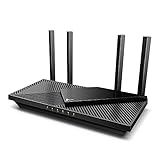
- Wi-Fi 6 Speeds: Up to 2402 Mbps on 5 GHz and 574 Mbps on 2.4 GHz bands ensure smoother streaming and faster downloads; support VPN server and VPN client¹. Actual speeds cannot exceed your internet plan and vary based on conditions, distance, & obstacles.
- A More Responsive Experience: Enjoy smooth gaming, video streaming, and live feeds simultaneously. OFDMA makes your Wi-Fi stronger by allowing multiple clients to share one band at the same time, cutting latency and jitter.²
- Expanded Wi-Fi Coverage: 4 high-gain external antennas and Beamforming technology combine to extend strong, reliable, Wi-Fi throughout your home.
- Improved Battery Life: Target Wake Time helps your devices to communicate efficiently while consuming less power.
- Improved Cooling Design: No heat ups, no throttles. A larger heat sink and redefined case design cools the WiFi 6 system and enables your network to stay at top speeds in more versatile environments.
What should you check before paying for a streaming VPN?
Write down the service, catalogue country, playback devices, network locations and privacy requirements first. Those details determine whether a VPN can solve your actual problem.
- Name the exact catalogue. “A VPN that works with Netflix” is not a single requirement: the US, UK, Canadian and other catalogues can detect different address ranges, and a service may work in a browser while its TV app behaves differently. Kaspersky explains that streaming users should prioritize stable bandwidth and servers in the countries whose catalogues they watch, while warning that streaming platforms can block VPN-linked IP addresses.
- Map every device. List phones, laptops, smart TVs, streaming sticks, consoles and any device used for casting. A native app is normally simplest on a computer or phone. For equipment that cannot install an app, investigate supported router firmware, a compatible VPN router or a provider’s smart-DNS/media feature. Smart DNS can alter apparent location for supported services but is not the same as an encrypted VPN tunnel.
- Check simultaneous connections. Count devices that will be active at the same time rather than assuming unlimited connections are necessary. Confirm whether a quoted limit applies per account, per household or per protocol. A router installation may cover devices behind that router, but devices on another network still need their own connection.
- Read privacy evidence separately. Encryption and IP replacement do not by themselves establish a no-logs policy. Look for a clear logging explanation, independent audits where available, transparent company information, a kill switch and modern protocol choices. Split tunnelling lets selected apps use the tunnel while others use the ordinary connection; obfuscation can help on networks that block VPN traffic. Neither feature guarantees catalogue access.
- Compare the whole contract. A low monthly equivalent often requires a one- or two-year prepayment. Record the amount charged today, the months included, the renewal amount and frequency, taxes or currency conversion, simultaneous-device limit and refund rules. App-store purchases can have different cancellation or refund procedures from direct purchases. Turn off auto-renewal after buying if you want to reassess at the end of the term.
How do you test a VPN for streaming without trusting a speed badge?
Test sustained playback on the exact service, country, device and network you intend to use. A single headline speed or server-count figure cannot predict whether a video will keep playing smoothly.
- Buy through a channel with a clearly stated refund period.
- Install the native app where possible and update it before testing.
- Connect to a server in the catalogue country. If the provider documents multiple locations there, note two plausible choices rather than relying on one.
- Play the quality you actually want for long enough to expose buffering. Record startup delay, quality drops, pauses, audio-sync problems and whether changing servers helps.
- Repeat at the time of day and on the Wi-Fi or mobile network you normally use. ISP capacity, local congestion, distance to the server, protocol overhead and the streaming service all affect the result.
- Try a second device, then test casting or local-service behavior. A device outside the VPN is not protected by it, and a local banking or casting app may need split tunnelling.
- If the service displays a proxy or unblocker error, try another documented server or ask support for current guidance. The service may require the VPN to be disabled; do not present a privacy feature as a guaranteed way around its controls.
This approach follows the compatibility-and-speed checklist described by iTechGuides. It produces observations about your setup rather than an invented universal performance score.
What’s actually slowing this PC down?
Pick the symptom - the matching free tool is one click away.
1. ExpressVPN: who is it for?
ExpressVPN suits a household that wants a conventional paid app, a broad country list and a defined refund window, provided its current servers work with the specific catalogue being watched. A dated May 2026 comparison lists 105 countries and 14 devices, while the provider’s displayed Basic offer specifies 10 simultaneous devices; treat those as offer- and date-specific figures, not a permanent guarantee.
No permanent free tier is identified in the supplied pricing information. The provider’s pricing page displays a 30-day money-back guarantee for new users and 10 simultaneous devices on the shown Basic offer. A PickMyVPN snapshot checked October 20, 2026 lists an example 28-month term at an equivalent $2.99 per month with $83.72 charged upfront. The introductory equivalent is not the renewal price, so save the renewal amount shown at checkout.
Shopping ad
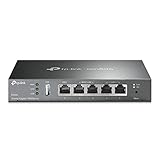
- 【Five Gigabit Ports】1 Gigabit WAN Port plus 2 Gigabit WAN/LAN Ports plus 2 Gigabit LAN Port. Up to 3 WAN ports optimize bandwidth usage through one device.
- 【One USB WAN Port】Mobile broadband via 4G/3G modem is supported for WAN backup by connecting to the USB port. For complete list of compatible 4G/3G modems, please visit TP-Link website.
- 【Abundant Security Features】Advanced firewall policies, DoS defense, IP/MAC/URL filtering, speed test and more security functions protect your network and data.
- 【Highly Secure VPN】Supports up to 20× LAN-to-LAN IPsec, 16× OpenVPN, 16× L2TP, and 16× PPTP VPN connections.
- Security - SPI Firewall, VPN Pass through, FTP/H.323/PPTP/SIP/IPsec ALG, DoS Defence, Ping of Death and Local Management. Standards and Protocols IEEE 802.3, 802.3u, 802.3ab, IEEE 802.3x, IEEE 802.1q
Upgrade when you need more than a temporary evaluation, multiple household devices or a longer term whose total and renewal terms you have accepted. Before paying, confirm that the app supports every platform you listed; if a TV or console cannot install it, verify router firmware, throughput expectations, support coverage and the hardware return policy.
2. Proton VPN: who is it for?
Proton VPN suits readers who want a usable free privacy tier for ordinary browsing and a clearly separated paid tier for streaming. TechRadar’s displayed plan table marks the free tier as unavailable for streaming, while Plus and Unlimited are marked available for streaming; that distinction matters more than simply seeing “free” in an account menu.
The same table lists Plus at $9.99 per month, $3.99 per month when billed for 12 months and $2.99 per month on a 24-month term. A May 2026 comparison lists 145* countries and 10* devices on paid plans. The asterisks and date indicate that the figures are a snapshot, not a promise that every current plan, country or app has identical availability. The provider’s pricing page should be checked for the exact billing currency, tax, renewal and any differences between Plus and Unlimited before purchase.
Use the free tier when your goal is to learn the interface, protect ordinary traffic or confirm that the app installs on a device; do not assume it will supply a streaming catalogue. Upgrade when the paid plan’s documented streaming availability, locations and simultaneous-device allowance match your test plan. Keep the refund terms and renewal date in your records.
How should you handle a smart TV, console or streaming stick?
First determine whether the device accepts a native VPN app. If it does not, choose between a supported router installation and a provider-specific smart-DNS or media feature.
Shopping ad

- 𝐒𝐞𝐜𝐮𝐫𝐞 𝐖𝐢-𝐅𝐢 𝐎𝐧-𝐓𝐡𝐞-𝐆𝐨 - Roam 6 connects to public Wi-Fi and creates a private network for multiple devices at once, ideal for hotels, cafes, airports, and homes. VPN enables secure work. Not eSIM/SIM card compatible. Requires external internet source.
- 𝐑𝐨𝐚𝐦 𝟔 𝐀𝐗𝟏𝟓𝟎𝟎 𝐝𝐮𝐚𝐥-𝐛𝐚𝐧𝐝 𝐬𝐩𝐞𝐞𝐝𝐬 - Wi-Fi 6 Speeds up to 1,201 Mbps (5 GHz) and 300 Mbps (2.4 GHz) for up to 60 devices simultaneously. Actual Wi-Fi speeds vary based on source bandwidth, environment, distance to devices, and obstacles. ◇§
- 𝐏𝐨𝐫𝐭𝐚𝐛𝐥𝐞 𝐚𝐧𝐝 𝐝𝐮𝐫𝐚𝐛𝐥𝐞 𝐝𝐞𝐬𝐢𝐠𝐧 - A portable travel router compactly designed for trips and adventures, featuring a 1 Gbps WAN/LAN port and a 1 Gbps LAN port for reliable wired connectivity.
- 𝐌𝐮𝐥𝐭𝐢𝐩𝐥𝐞 𝐰𝐚𝐲𝐬 𝐭𝐨 𝐜𝐨𝐧𝐧𝐞𝐜𝐭 - (1) Router Mode: Connects to public Wi-Fi, ISP, or phone (USB tethering). (2) AP/RE/Client Mode: Adds WiFi to wired setups, extends WiFi, or connects wired devices wirelessly.
- 𝐎𝐮𝐫 𝐜𝐲𝐛𝐞𝐫𝐬𝐞𝐜𝐮𝐫𝐢𝐭𝐲 𝐜𝐨𝐦𝐦𝐢𝐭𝐦𝐞𝐧𝐭 - TP-Link is a signatory of the U.S. Cybersecurity and Infrastructure Security Agency’s (CISA) Secure-by-Design pledge. Advanced security is integrated into the device’s design, development, and ongoing maintenance.
- Router route: verify supported firmware, processor capacity, expected throughput, IPv6 behavior, local-network discovery and whether the provider supplies installation instructions. A router can cover many devices at once, but every device behind it shares that tunnel and local troubleshooting becomes more complex.
- Smart DNS route: confirm which services and countries are supported and understand that DNS-based location handling is not an encrypted VPN tunnel. It may be appropriate for a playback device that cannot run an app, but it does not provide the same privacy properties.
- Separate-device route: run the VPN on a laptop or phone and use a supported casting method only after checking that local discovery still works. Split tunnelling may keep the casting or home-control app on the local network while the player uses the VPN.
Count the devices that remain outside the router or home network. They still need an app or another supported connection path.
What privacy and account checks matter for streaming?
Choose a provider whose privacy documentation is understandable enough to evaluate, not one that relies only on a “secure” label. Confirm the logging policy, retention language, ownership or corporate identity, independent audit claims, kill-switch behavior and available protocols. Kaspersky’s explanation of VPN fundamentals is a useful starting point: the tunnel encrypts traffic to the provider and changes the IP address visible to the destination.
Streaming accounts remain your responsibility. A VPN does not create entitlement to a catalogue, remove copyright restrictions or override account controls. Keep payment details and account credentials protected, and follow the service’s terms and local law. If you use split tunnelling, remember that excluded apps connect without the VPN’s encryption and IP replacement.
How do you compare monthly prices with the real cost?
Calculate the first-term bill and the renewal bill separately. For example, a displayed $2.99 monthly equivalent over 24 months means a two-year commitment, not a month-to-month charge. Add taxes, currency conversion, router hardware, app-store differences and any extra account or connection requirements.
For the examples above, the October 20, 2026 snapshot records ExpressVPN at $83.72 upfront for 28 months and Proton VPN at $71.76 upfront for 24 months. These figures illustrate contract math; promotions and renewals can change. The snapshot also records a 30-day guarantee for the listed major providers, but always read the current provider terms and confirm whether an app-store purchase follows a separate refund process.
Do these 3 things before closing this tab:
1Repair Windows errors before they cause bigger problems2Scan for outdated or missing drivers - takes under a minute3Clear out junk files and repair common Windows errorsShopping ad
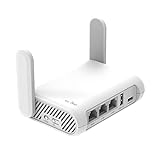
- 【AC1200 Dual-band Wireless Router】Simultaneous dual-band with wireless speed up to 300 Mbps (2.4GHz) + 867 Mbps (5GHz). 2.4GHz band can handles some simple tasks like emails or web browsing while bandwidth intensive tasks such as gaming or 4K video streaming can be handled by the 5GHz band.*Speed tests are conducted on a local network. Real-world speeds may differ depending on your network configuration.*
- 【Easy Setup】Please refer to the User Manual and the Unboxing & Setup video guide on Amazon for detailed setup instructions and methods for connecting to the Internet.
- 【Pocket-friendly】Lightweight design(145g) which designed for your next trip or adventure. Alongside its portable, compact design makes it easy to take with you on the go.
- 【Full Gigabit Ports】Gigabit Wireless Internet Router with 2 Gigabit LAN ports and 1 Gigabit WAN ports, ideal for lots of internet plan and allow you to connect your wired devices directly.
- 【Keep your Internet Safe】IPv6 supported. OpenVPN & WireGuard pre-installed, compatible with 30+ VPN service providers. Cloudflare encryption supported to protect the privacy.
Set a calendar reminder several weeks before renewal. If the real playback test fails, cancel according to the provider’s procedure and request a refund within the stated window. Keep screenshots of the checkout term, renewal amount and guarantee so you can resolve a billing dispute without guessing what you purchased.
Independent reader supportYour contribution helps us test, update, and keep practical guides available for everyone.What should you do when a VPN keeps buffering?
Buffering is usually a sustained-bandwidth or network-path problem, not proof that a VPN is inherently unsuitable. Diagnose one variable at a time.
- Pause other heavy downloads and test the ordinary connection briefly to establish whether the home network is already congested.
- Move to a nearer server in the same target country, then try a second documented location.
- Change protocol only when the app offers a documented alternative; record whether stability improves.
- Test wired Ethernet or a less congested Wi-Fi band on a TV or streaming stick.
- Lower playback quality temporarily. If the stream stabilizes, the available sustained bandwidth is the constraint.
- Check whether the service is showing a proxy error rather than a bandwidth failure. Follow support guidance; disabling the VPN may be the only permitted solution.
Do not infer performance from country count, “up to” speed or an award. Your ISP, Wi-Fi, server distance, protocol and the streaming platform can change the outcome from one evening to the next.
What is the practical decision checklist?
Use this checklist immediately before subscribing:
- Named streaming service and desired catalogue country
- Every playback device, including equipment that cannot install an app
- Required simultaneous connections
- Native-app, router or smart-DNS path confirmed
- Privacy policy, logging language, kill switch and protocol reviewed
- Refund channel and eligibility confirmed
- First-term charge, months included and renewal amount recorded
- Auto-renewal reminder set
- Real playback test completed at normal time, quality and network
- Plan to stop or refund if the exact service remains blocked
For catalogue availability, keep expectations conditional: a provider may lose an address range, a service may change detection and an app may treat VPN traffic differently from a browser. The responsible choice is the provider and plan that pass your own documented test while meeting your privacy, device and budget requirements.
Crashes, No Sound, or Screen Glitches?
Random freezes, missing sound and display glitches usually trace back to one bad driver. Find and replace yours safely.Free scan · under a minutePC Slower Than It Used to Be?
A free scan shows the junk files, broken settings and background clutter dragging Windows down - then fixes them in one click.Free scan · Windows 10 & 11Frequently Asked Questions
Can a free VPN stream every catalogue?
No. Free tiers may exclude streaming, offer only a few locations or impose data limits that make sustained video impractical. Check the exact plan’s streaming policy and data allowance before relying on it for a trip or a television setup.
Shopping ad
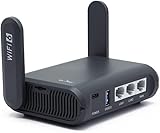
- 【AXT1800 WiFi 6 Wireless Router】Slate AX offers powerful Wi-Fi 6 network connection with a dual-band combined Wi-Fi speed of 1800 Mbps (600 Mbps for 2.4GHz and 1200 Mbps for 5GHz). Enhance Wi-Fi performance with MU-MIMO, OFDMA, BSS color and able to connect to up to 120 devices simultaneously.
- 【Fast and Secure Browsing】IPv6 supported; OpenVPN & WireGuard pre-installed, compatible with 30+ VPN service providers, OpenVPN speed up to 500 Mbps; WireGuard speed up to 550 Mbps. Cloudflare encryption supported to protect the privacy.
- 【Easy File Sharing】Our NAS feature supports SAMBA and WebDav protocol. By plugging an external USB hard disc into the router, you can create a private network to store and share your documents.
- 【Runs on OpenWrt 21.02】Slate AX runs on the latest OpenWrt 21.02 operating system (Kernel version 4.4.60), with mass device connection capabilities, and significantly reduced signal interference. You can customize the router and install applications based on your preferences.
- 【Repeater for Public, Hotel WiFi】Convert a public network(wired/wireless) to a private network(wired/wireless) for secure surfing. Work with Captive Portal. (Note: Most of the Free Public Wi-Fi hotspot set a time limit for users, which will disconnect your devices once the time is over. To deal with this situation, please reconnect your router to the wifi.)
Will one VPN account cover my smart TV and phone?
Only if both devices have a supported app or share a correctly configured router connection, and the account allows enough simultaneous connections. A phone on cellular data is outside the protection of a home router, so it may need its own app session.
Why does a streaming app block a VPN while the website works?
Apps and browsers can use different detection signals, DNS paths and address ranges. Try the provider’s documented alternatives, check for an app update and contact support; the platform may require the VPN to be disabled.
Should I buy a VPN router for streaming?
A VPN router is useful for devices that cannot install an app, but verify firmware support, throughput, local-network discovery and return terms first. Every device behind the router shares the tunnel, which can complicate troubleshooting and affect local services.
How can I avoid a surprise VPN renewal charge?
Record the renewal date and amount at checkout, then disable auto-renewal through the same purchase channel before the term ends if you want to reassess. App-store subscriptions may require cancellation through the store rather than the provider’s website.
Quick Recap
Product prices and availability are accurate as of the date/time indicated and are subject to change. Any price and availability information displayed on Amazon at the time of purchase will apply.

