Windows Errors? Fix Them Before They Spread
Repair common Windows errors and clear accumulated junk for a smoother, more stable PC - no reinstall needed.Free scan · no reinstallCrashes, No Sound, or Screen Glitches?
Random freezes, missing sound and display glitches usually trace back to one bad driver. Find and replace yours safely.Free scan · under a minuteChoose a BPM that serves the musical job, then treat it as a target to verify in the generated audio. For AI music, start with the listener’s use case and vocal phrasing, test a small BPM range, and keep the version whose groove, lyric density, and arrangement remain usable. The supplied information for Suno and Udio does not establish a dedicated BPM lock or tempo readout, so neither platform should be treated as guaranteeing an exact numeric tempo from a prompt.
Pick A Starting BPM From The Listening Context
Use these as production starting points, not platform specifications. A metronome or DAW can confirm the actual result after generation.
| Use Case | Starting Range | What To Listen For |
|---|---|---|
| Ambient background, coding stream, or reflective underscore | 60–80 BPM | Long phrases, restrained drums, and enough space for narration |
| Pop or singer-songwriter demo | 90–115 BPM | Clear lyric diction and a chorus that does not feel rushed |
| Dance, workout, or energetic creator intro | 120–132 BPM | Consistent kick placement and a repeatable four-on-the-floor pulse |
| Half-time hip-hop or cinematic tension | 70–90 BPM | Weighty downbeats and room for denser lines |
If the brief is for a video, match the range to the edit: slower music leaves room for speech and cuts, while faster music can make short transitions feel more urgent.
Turn The BPM Choice Into A Prompt
- State the target tempo and tolerance. Write “around 105 BPM” or “105–110 BPM” instead of implying that the generator will obey an exact click.
- Describe the pulse. Add terms such as “steady four-on-the-floor,” “syncopated half-time drums,” or “laid-back swung groove.” BPM alone does not describe feel.
- Describe phrase density. Tell the model whether the verse needs sparse lines, rapid rap phrasing, sustained vowels, or an instrumental drop.
- Specify arrangement landmarks. Request an intro length, verse, pre-chorus, chorus, bridge, and outro so you can judge whether the tempo supports the whole form.
- Generate controlled alternatives. Keep the words and instrumentation constant while changing only the target BPM, for example 100, 105, and 110 BPM.
Example prompt for a 105 BPM creator intro: “105 BPM, bright electronic pop, steady four-on-the-floor kick, 8-bar instrumental intro, concise vocal phrases, strong 16-bar chorus, clean ending for a video cut.” Example for a 78 BPM coding stream: “Around 78 BPM, warm instrumental electronica, sparse percussion, evolving pads, no busy lead, consistent pulse for spoken narration.”
The Tool Desk
Outbyte Driver Updater FREEScan for outdated or missing drivers - takes under a minuteDriver Scan →Outbyte PC Repair FREERepair Windows errors before they cause bigger problemsFix Now →Shopping ad
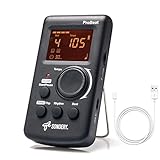
- Direct and fast setting of beat, tempo, rhythm by buttons and knobs. Easily reading color screen helps a lot to understand what you want out of your Sondery brand ProBeat digital metronome.
- Vocal counting option, and 3 types of digital sounds. Big sound out of a speaker. While the LED light on the top gives a clear visual tempo indication and the earphone plug is great for practicing without click or during performance.
- Easily setting tempo by a rotary dial ranging from 40 to 208bpm. 10 beat patterns including 0, 1, 2, 3, 4, 5, 6, 7, 8, 9. And Sondery ProBeat metronome covers all the needs of different rhythm training.
- Tap function allows you to enter your own tempo by each 2 taps. Timer function to set practice time length at 15 minutes, 30, 45 and 60 minutes. Sondery digital metronome helps improving your timing in a rich variety of musical styles.
- Digital metronome is powered by chargeable Li battery inside. Charge ProBeat metronome from any 5V USB power source. Pocket size 5*3*1inch. Weight only 0.26lb.
Use Suno When You Need A Full Song Workflow
Suno is described as a broad workspace for complete songs, editing, stems, and mobile apps. Its documented strengths include vocals, lyrics, instrumentation, production, editing, remixing, extensions, section replacement, and stem export.
Run A Three-Version Tempo Pass
- Paste the same lyric and arrangement brief three times, changing only the BPM target.
- Compare whether the vocal consonants land cleanly, whether the chorus has enough lift, and whether the outro ends where your edit needs it.
- Use Suno’s editing, remixing, extension, or section-replacement functions to repair the strongest version instead of changing several variables at once.
- When you need separate parts for a DAW, use the documented stem-export capability. Confirm the current plan’s rights and export limits before publishing.
Suno’s supplied limitations say the Free Plan does not include commercial rights or stem separation, Pro limits downloads to 20 songs per month, and Suno Studio is limited to Premier. Check the current plan page before selecting a production workflow.
Shopping ad

- 🎵[Modern and Classic Design] : SDREAM Digital Metronome with LCD display makes practice much easier.This Electronic metronome retains the classic pyramid-shaped design while incorporating elements of modern style. It not only inherits the classic appearance but also improves its precision and ease of use. Moreover, they are durable.
- 🎵[Feature Rich Metronome]: There are two voice options: human English voice beats / electronic metronome beats. The digital metronome for guitar has 10 rhythm patterns.Direct and fast setting of metronome speed, beat, tempo, rhythm by buttons on SDREAM digital metronome.The tempo speed can be easily set within the range of 40 to 208 beats per minute.
- 🎵[Rechargeable Modes]: You can also use the Type-C charging cable provided by SDREAM store for power supply which can work for more than 8 hours. It also has a 3.5mm headphone jack for Immersive practice without disturbing others.
- 🎵[Suitable for all instruments]: SDREAM Digital Metronome is highly suitable for both beginners and seasoned musicians,10 beat patterns including 0, 1, 2, 3, 4, 5, 6, 7, 8, 9 meeting the requirements of playing all musical instruments such as piano, guitar, violin, bass, ukulele, trumpet, Harmonica, Saxophone, drum, etc. Universal metronome with vocal counting is the best gift for family and friends.
- 🎵[Compact and convenient]:This electronic metronome for piano is only the size of a palm and Weight only 0.29lb. Digital metronome for musicians is compact and easy to carry. SDREAM digital metronome for piano can be easily put in a pocket or a musical instrument bag. Especially for those who need to practice or perform outside frequently,the portability advantage of digital metronome is more obvious.
Use Udio When Prompt Iteration And Vocal Editing Lead
Udio is described as prompt-led song creation with lyric tools, audio transformations, and timeline editing. Its strengths include generating vocal or instrumental songs from text prompts and lyrics, editing lyrics, blending voice references, shaping styles, extending or transforming audio, and refining results in Sessions.
Keep Tempo Tests Comparable
- Create one prompt at the chosen BPM and save the lyric and style wording.
- Duplicate it for two nearby targets, such as 96, 100, and 104 BPM, while keeping the vocal instructions unchanged.
- Use lyric editing to remove syllables that feel crowded at the faster target, then use timeline editing or Sessions to refine transitions.
- Check the current download status before planning delivery: the supplied information says audio, video, and stem downloads are disabled during a transition period, although stem separation is available.
Because Udio’s documented information does not promise exact BPM adherence, measure the rendered result in your own audio tool when synchronization matters.
Recommended Free Tools
Shopping ad

- Enhanced Design Upgrade – The SQ-50-V improves on the classic SQ50 with a sleek new look, upgraded interface, and even easier operation for musicians of all levels.
- Precision Tempo Control – Effortlessly set tempos from 40 to 208 BPM using the intuitive 39-position rotary dial—ideal for dialing in accurate timing for practice or performance.
- Adjustable Volume & Click Options – Choose between two distinct click tones (high or low) and adjust the volume to suit your environment—perfect for solo practice or group rehearsals.
- Built-In Tone Generators (A & Bb) – Tune your instrument with the built-in A=440Hz tone or the optional Bb tone, making this metronome a versatile tool for brass, strings, and woodwind players alike.
- Visual Beat with LED & Earphone Jack – Follow the beat with a red LED light for visual cueing, or combine it with audible clicks. Includes an earphone jack for silent practice in any setting.
Judge The Result With A Technical Checklist
- Grid: Does the main kick or downbeat stay close to the intended tempo, or does it drift?
- Vocal fit: Are syllables intelligible at the selected BPM, especially at line endings and chorus entrances?
- Energy curve: Does the arrangement create contrast between intro, verse, chorus, and bridge without an unwanted rush?
- Editability: Can you extend, replace, or transform the section that misses the brief using the platform’s documented tools?
- Delivery: Do the available exports, download status, and plan limits fit your publishing pipeline?
Handle Voices, Covers, Samples, And Publishing Carefully
Only use a voice reference, cover concept, lyric, or uploaded sample when you have the necessary consent and your use follows the platform’s current terms. Suno’s Free Plan is documented as lacking commercial rights; Udio’s supplied information documents a download transition but does not establish a commercial-rights rule. Check each platform’s terms and your selected plan before releasing or monetizing a track.
Independent reader supportYour contribution helps us test, update, and keep practical guides available for everyone.A Practical Default For Your Next Brief
Start at 105 BPM for a general vocal creator track, make 100 BPM and 110 BPM alternatives, and keep the version with the clearest words and most stable groove. If the music sits under speech, begin near 78 BPM; if it must drive rapid cuts or exercise content, begin near 128 BPM. Treat every number as a production target until you verify the generated audio.
Quick Recap
Shopping ad

- Compact 3-in-1 Design: Combines a digital metronome, chromatic tuner, and tone generator in one pocket-sized unit. Easy to carry in your instrument case—perfect for daily practice, music lessons and performances
- Versatile Digital Metronome: Adjustable tempo from 30–260 BPM, 10 beat patterns (0–9), and 8 rhythm styles help you improve timing and groove across multiple musical genres
- Fast, Precise Tuning for Multiple Instruments: Supports A0–C8 tuning range, A4 calibration (430–450Hz), and ±0.5 cent accuracy. Ideal for guitar, bass, violin, ukulele, mandolin, flute, trumpet, and other string or wind instruments. (Note: This AMT-560 tuner is not suitable for piano tuning. )
- Clear Backlit Display & Multi-Sense Feedback: The large LCD screen with 45° angled design ensures perfect readability in any light. Combined with bright LED lights and clear sounds, it provides intuitive visual and auditory rhythm cues. Adjustable volume and headphone jack allow silent or loud practice anywhere
- Practical Tone Generator for Ear Training: Quickly switch modes to generate precise reference tones. An essential tool for developing intonation, perfect pitch, and meeting specific rehearsal or performance requirements
Shopping ad
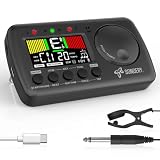
- 3 in 1 metrotuner. The MetroTune combines a tuner, a metronome and a tone generator in a pocket size device. Equipped with beautiful colors screen, 3 indicators, loud speaker, Mic and cable jack detections, earphone output, volume wheel and folding kickstand to make operation super easy.
- English vocal metronome with tap tempo. A broad range of tempo 30-260bpm, setting self tempo by tap, beats from 0 to 9, and various 8 rhythms. English vocal counting greatly helps follow the timing under a correct beat.
- Versatile tuner. The fast and accurate tuner features various tuning items for chromatic, guitar, bass, ukulele, acoustic guitar, electric guitar, violin, mandolin, piano, saxophone, trumpet, and other wind instruments, and also 12 different tuning keys, with pitch calibration from 410Hz to 450Hz, by tuning method using internal mic or enclosed pickup cord.
- Jog dial designed to easily use. The JOG Dial allows you to easily and quickly get a desired tempo for metronome, and to swift to a pitch in the Tone Generator and the Tuner.
- Power rechargeable. Plug to 5V USB power source with enclosed type C USB cord to charge the device. Equipped with a large LCD color screen and LED indicator, making it very user-friendly, especially in dark environments. MetroTune comes with instructions in seven languages, making it easy for musicians around the world to use.
Product prices and availability are accurate as of the date/time indicated and are subject to change. Any price and availability information displayed on Amazon at the time of purchase will apply.




