Fix a generic AI music prompt by replacing broad labels such as “upbeat pop” with a short, prioritized brief: the scene or use, the musical role, the groove, the instruments, the vocal direction, and one production detail. Generate from that brief, identify the most important mismatch, then change only that part of the prompt for the next version.
Why AI Music Prompts Sound Generic
Words such as “epic,” “chill,” “cinematic,” and “catchy” describe impressions, not the musical choices that create them. A prompt can also pull in several directions: “relaxed, high-energy dance music with a huge orchestral sound” gives the model competing priorities. The result may include familiar genre signals without a clear identity.
Give the model observable musical directions instead. Specify what the track is for, what should lead, how the rhythm should feel, what should stay in the background, and what the arrangement should do. Keep the brief focused: a few compatible choices are more useful than a pile of mood adjectives.
Build A Prompt That Has A Point Of View
Write the prompt in this order, removing any direction that does not matter to the result:
Shopping ad
![Ace Studio Artist Pro 2 Lifetime - AI Music Studio for Professionals [Download Card]](https://m.media-amazon.com/images/I/31uc33dFszL._SL160_.jpg)
- This product is sold and shipped as a download card with printed instructions on how to download and register the software online.
- Video to Music: Generate royalty-free music perfectly synced to your video.
- Text to Samples: Generate sample loops using text that can match your tracks.
- Stem Splitter: Split a track into vocal, drums, bass, and instruments.
- PDF to MusicXML: Turn your PDF scores into MusicXML.
- Use: Name the listening context, such as a quiet coding montage, a short intro, or a tense scene transition. This anchors the track’s energy and role.
- Musical identity: Choose a broad style or blend, then add a more specific reference in musical terms: for example, “sparse electronic underscore with a pulsing low synth,” rather than “cool electronic music.”
- Groove: Describe the feel with plain language: steady and restrained, loose and swung, or urgent with a repeating pulse. Avoid adding a tempo number unless you know the tool supports that control.
- Arrangement: Say what enters first, what carries the main idea, and whether the energy should build, hold, or resolve. Avoid prescribing many section changes at once.
- Sound and space: Name a few defining sources and their roles, such as muted keys for harmony, dry percussion for timekeeping, and a soft pad in the background. Add one useful production cue, such as intimate or spacious.
- Vocal direction: State “instrumental” if there should be no voice. For a vocal track, describe the delivery and lyrical subject; do not rely on “beautiful vocals” to communicate either.
Turn A Vague Brief Into A Specific One
Use this before-and-after example as a pattern, not as a claim about a particular genre preset or guaranteed output:
- Vague: “Make upbeat electronic music for a video.”
- More directed: “Instrumental electronic bed for a focused coding montage. A steady, restrained pulse under a warm repeating synth figure; keep percussion light, leave space for narration, and add a small lift near the end without a dramatic drop.”
The second prompt tells the generator the track’s job, what carries it, what must remain unobtrusive, and how its energy changes. If the output still feels generic, replace one broad phrase with a concrete musical role. For example, change “warm synths” to “a soft repeating synth motif carrying the harmony.” Keep other instructions fixed so you can tell which change helped.
Shopping ad
![Ace Studio Artist 2 Lifetime - AI Music Studio for Creators [Download Card]](https://m.media-amazon.com/images/I/31je5QQLf4L._SL160_.jpg)
- This product is sold and shipped as a download card with printed instructions on how to download and register the software online.
- Video to Music: Generate royalty-free music perfectly synced to your video.
- Text to Samples: Generate sample loops using text that can match your tracks.
- Stem Splitter: Split a track into vocal, drums, bass, and instruments.
- PDF to MusicXML: Turn your PDF scores into MusicXML.
Use Suno And Udio For A Controlled Revision Loop
| Tool | What The Prompt Workflow Can Draw On | Practical Boundary |
|---|---|---|
| Suno | Song generation with vocals, lyrics, instrumentation, and production; its workspace also supports editing, remixing, extensions, section replacement, and stem export. | Do not assume a particular genre control or prompt syntax from those general capabilities. Check the vendor’s current guidance for the specific controls you need. |
| Udio | Text prompts and lyrics for vocal or instrumental songs, plus lyric editing, style shaping, audio transformation, extension, and refinement in Sessions. | Audio, video, and stem downloads are disabled during its stated transition period; stem separation is available, but stem export is currently disabled. Check the vendor’s current guidance for prompt controls and availability. |
- Start with one complete brief. Include the use, musical identity, groove, lead source, vocal direction, and arrangement arc. If lyrics matter, keep their subject and delivery direction distinct from the sound description.
- Listen for the biggest mismatch. Decide whether the result misses the role, groove, lead sound, vocal direction, or energy arc. Choose one mismatch, not a general verdict such as “make it better.”
- Make one targeted revision. Add or replace a phrase that directly addresses that mismatch. If the track is too crowded for narration, specify fewer foreground parts and more space. If it lacks forward motion, clarify the pulse rather than adding unrelated instruments.
- Use editing only for the part that needs work. Suno lists section replacement and editing among its capabilities; Udio lists lyric editing and refinement in Sessions. Match the requested change to a capability described for the tool, and consult its current instructions for the actual controls.
- Keep a prompt log. Save each version and note the one instruction you changed and what you heard. This makes it easier to keep a useful direction while removing words that do not seem to affect the result.
Check Specifics Before You Commit The Prompt
The available product descriptions establish broad song creation and editing capabilities, but do not establish support for every subgenre, instrument, occasion, technical control, or prompt syntax. If your brief depends on a precise style, meter, tempo, key, duration, language, or export workflow, check the relevant vendor’s current documentation before building the project around it.
For voices, covers, samples, and commercial use, use only material and voice references you have permission to use, and check each platform’s current terms for the intended use. The product descriptions here do not establish the applicable rights for a particular project.
Quick Recap
Shopping ad
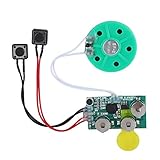
- Widely used Can be used for Christmas cards , creative gift boxes , jewelry boxes , crafts , children's toys , etc.
- 3 battery powered , 8Ω 0.25W green speaker with loud sound.
- Control the voice movement with induction.
- The cable length is designed for your convenience. Selectable play mode Loop play ,one time play. The recording can be repeated , and each recording will overwrite the last recording.
- 4 minutes - Record music, or what you want to say, up to 4 minutes, depending on your requirements.
Shopping ad

- Questions Built To Spark Debate: This 150-question, 152-card deck gets a room of music lovers talking, arguing, and laughing. Every card sets up an opinion-driven question with no single right answer, so revisit iconic songs, debate the greatest artists and albums of all time, and defend your hottest music takes card by card.
- Built For Dinner Tables And Road Trips: Pull a card at dinner, in the car on a long drive, or during a holiday gathering and pass it around the table or the family group. Each question is printed on a sturdy card sized to hold and shuffle easily, so parents, kids, and teens can take turns reading, answering, and talking without needing any setup, timer, or extra pieces.
- Made For Date Night, In Or Out: Pull the deck out over a home-cooked dinner, on a weekend getaway, or during a quiet night in, and let one card guide the whole conversation. The cards are printed on sturdy, easy-to-shuffle stock sized to hold in one hand, so a couple can pass the deck back and forth without any extra setup or rules to remember.
- Fits Any Occasion: Toss the deck in a bag for a holiday trip, keep it on the table for a Sunday dinner, or bring it along on vacation as a screen-free activity for the whole car. It travels well, sets up instantly, and works just as easily for a quiet weeknight as it does for a big Thanksgiving or Christmas gathering.
- Perfect Gift For Everybody: Pair it with other Tales editions Couples, Women's, or Debates to build a full lineup for every group that visits, and picture the whole family pulling a new card together long after this one becomes a favorite.
Shopping ad

- Flashcardables high quality double sided laminated flash cards give you peace of mind that they will last for many years. Compared to card stock paper cards that don't even come in a box, flashcardables are an easy choice.
- The bright colors and large print makes learning more fun and easier for the student.
- Color coded categories make it easy to memorize and drill on specific skills including Notes, Clefs, Tempo, Dynamics, Melodic & Harmonic Intervals, Note Values, Rests, Time and Key Signatures, and Music Symbols
- Rounded corners and lamination make for quick and easy handling, no more sticking cards and sharp corners. Ouch!
- Satisfaction Guaranteed. We know you will love our music theory flashcards, but if you have any problems we will make sure they get solved!
Product prices and availability are accurate as of the date/time indicated and are subject to change. Any price and availability information displayed on Amazon at the time of purchase will apply.




