Outdated Drivers Are Slowing You Down
One free scan finds every outdated or missing driver and matches the right update for your exact hardware.Free scan · exact hardware matchWindows Errors? Fix Them Before They Spread
Repair common Windows errors and clear accumulated junk for a smoother, more stable PC - no reinstall needed.Free scan · no reinstallUse AI to draft a melody, then shape its contour, rhythm, and fit against chords by listening and revising. For a workflow with documented melody-specific controls, start with SongIntent for melody sketches and cadence capture, or use Song Cage to work with melody, chords, playback, and recording in one songwriting workspace. LandChords offers chord anchoring and melody playback for checking how a line sits over harmony.
Choose A Workspace For The Melody Task
| Tool | Melody-related capabilities established | Useful when | What to verify |
|---|---|---|---|
| SongIntent | Melody sketches, cadence capture, structure, and line-level revisions | You want to turn a sung or played idea into a revisable song workflow | Specific input formats, melody notation, and audio or MIDI export details |
| Song Cage | Combines chords, melody, lyrics, arrangement, playback, and recording; supports an AU/VST3 plugin for major DAWs | You want the melodic idea alongside the rest of the song and your DAW | How melody is entered or edited, and which export functions are included in your plan |
| LandChords | Chord anchoring and melody playback; its Free plan allows one melody line per section | You want to hear a melody against chords while drafting sections | Specific melody editing controls and whether the Free plan’s one-line limit fits your arrangement |
These descriptions establish melody-related workflows, not support for a particular genre, instrument, scale, notation system, or prompt syntax. Check the vendor’s site for those specifics before building a workflow around them.
| # | Preview | Product | Price | |
|---|---|---|---|---|
| 1 |

|
Alesis Melody 61 MK4 61-Key Piano Keyboard | $85.00 | Buy on Amazon |
| 2 |

|
Alesis Melody 32 Mini Piano Keyboard | $59.00 | Buy on Amazon |
| 3 |

|
Akai Professional MPK Mini IV 25-Key USB-C MIDI Keyboard Controller, Black | $99.00 | Buy on Amazon |
| 4 |
|
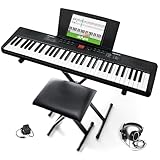
Alesis Melody 61 MK4 61-Key Piano Keyboard Bundle | $106.99 | Buy on Amazon |
| 5 |

|
M-AUDIO Keystation 49 MK3 USB MIDI Controller | $129.00 | Buy on Amazon |
Prepare A Small Musical Brief
Before asking for a draft, decide what the melody must do. Keep the brief short enough to revise: name the section, the feeling or purpose, the vocal or instrumental role, and any limits you already know. Do not assume a tool supports every detail as a control; treat them as creative instructions unless the vendor documents otherwise.
- Section: for example, a chorus hook or an instrumental response.
- Contour: describe motion in plain language, such as “begin in a narrow range, rise toward the final phrase, then resolve downward.”
- Rhythm: say whether the phrase should feel sparse, even, or rhythmically busy.
- Harmony: provide the chord context if the workspace supports it, or keep the progression beside the melody for playback checks.
- Constraints: note a comfortable range or a phrase length only if you can check it in the tool or by listening afterward.
A concise idea to adapt is: “Draft a memorable chorus melody with a compact opening phrase, a gradual lift, and a clear ending. Keep space between phrases so the lyric can be understood.” Use this as a musical brief where the product accepts an idea or text; it is not a claim about a vendor’s exact prompt format.
Quick wins for a faster PC:
Scan for outdated or missing drivers - takes under a minuteDriver Scan →Clear out junk files and repair common Windows errorsFree Scan →Shopping ad
- Compact - Electric keyboard piano, featuring 61 keys, perfect for helping new piano students of all ages develop their finger strength and dexterity
- Massive Sound Library - 300 inspiring built-in sounds with the ability to layer or split 2 sounds and sustain/vibrato FX, 300 accompaniment rhythms with auto-chord functions, and 30 demo songs
- Everything You Need to Start Today - Including a full-back sheet music/tablet stand, power adapter, and access to online piano lessons from Skoove and Melodics
- Fun Practice Features - Built-in metronome; Record Mode for revisiting your practice sessions; Accompaniment Rhythm Mode that instantly generates play-along songs from 300 different genres
- Ready to Travel - Melody 61 is lightweight (6.6 lbs/3 kg) and easy to carry, and can be powered via (6) AA batteries (not included) for when you're ready to bring the show on the road
Generate And Compose In A Revision Loop
- Capture the seed. Sing or play the fragment you want to preserve. In SongIntent, use its documented cadence capture or melody sketch workflow; check its site for supported capture formats and controls.
- Ask for one focused draft. Give the workspace your section purpose and contour brief. SongIntent supports generating from ideas, lyrics, flows, beats, or melodies, but its specific prompt syntax is not established here.
- Listen against the harmony. Put the draft over the intended chords. Song Cage combines chords and melody with playback; LandChords supports chord anchoring and melody playback. Listen for notes that clash with the chord or phrases that feel hard to sing or play.
- Revise one dimension at a time. Change the contour, rhythm, or phrase ending, then replay it. SongIntent lists line-level revisions, while Song Cage combines melody with arrangement and playback. The exact editing controls are vendor-specific.
- Check the phrase without the backing. Sing or play the melody alone, then with the chords. If the hook loses its shape without the accompaniment, revise the line rather than relying on the backing to make it memorable.
- Place it in the song. Use the workspace’s structure or arrangement features to hear how the phrase follows the preceding section. SongIntent supports structure; Song Cage combines melody with arrangement. Confirm the available section controls on the product site.
- Move the result into production. Song Cage supports an AU/VST3 plugin for major DAWs, but its PDF and MIDI export require a paid plan. SongIntent lists TXT export on its Free plan; audio render limits depend on plan. Verify the export you need before committing to a transfer workflow.
Compare The Melody In Context
Do not judge a generated line only by whether it sounds polished in a full-track preview. Check these musical criteria with the actual chords, lyric, and instrument you plan to use:
- Contour: Can you hear the phrase’s direction, and does its high or low point support the section?
- Rhythmic fit: Are important syllables or accents landing where you intend?
- Harmonic fit: Does the line sound coherent over the progression, including at phrase endings?
- Repeatability: Can you sing or play the hook again without having to reconstruct it from the backing?
- Contrast: Does the line differ enough from nearby phrases to make the section structure clear?
If you are composing for a specific genre, instrument, language, scale, or DAW workflow, check that the chosen product explicitly supports the required controls and export format. The capabilities listed here do not establish those details.
Shopping ad
- Feature Packed Digital Piano for beginners -Portable electronic keyboard with 32 premium mini piano style keys with power via USB or 4 AA batteries (not included)
- Premium Electric Piano Keyboard Sounds - 300 voices (including Acoustic Piano, Electric Piano, Strings, Organ, Synth, Drums and much more); built in speakers that deliver room-filling sound
- Practice Makes Perfect -1/8" stereo headphone output mutes the built in speakers; 40 Demo songs; accompaniment mode with 300 built-in rhythms; built in record feature for recording your performance
- Play Keyboard Anywhere - Power via the included USB cable or 4 AA batteries (not included) for professional piano performance wherever you go
- Powerful Educational Features - 1-month Premium subscription and 100 keys lessons from Melodics and a 3-month Premium subscription for interactive online piano lessons from Skoove
Check Rights Before Using A Generated Vocal Or Track
For a generated vocal, cover, or any material that uses a reference recording, obtain the necessary consent from the people whose voices or recordings are involved. Review the selected platform’s current terms for ownership, permitted uses, and commercial rights; those terms are not established here. Song Cage’s Free plan limits the song library to one song, and PDF and MIDI export require a paid plan. SongIntent’s Free plan allows one active project and five AI assists per month, with one render per month. Check each vendor’s current plan and terms before publishing or monetizing work.
Quick Recap
Shopping ad
- Ultimate Expression - 49 full-size velocity-sensitive keys provide a natural feel that captures every subtle nuance of your performance
- Total Control - Volume fader, transport and directional buttons for easy control of your software, plus ergonomically-designed pitch and modulation wheels, Octave up and down buttons and sustain pedal input for expressive performances
- Immediate Creativity - Easy plug-and-play connection to your Mac or PC-no drivers or power supply required; compatible with iOS devices via the Apple to USB Camera Adapter (sold separately)
- Your Studio Centrepiece - Compact design fits any desk, studio or stage setup perfectly and advanced functionality customizes your controls for your recording software
- Premium Software suite included - MPC Beats, Ableton Live Lite, Velvet, XPand2, Mini Grand, and Touch Loops
Shopping ad
- Compact - Electric keyboard piano, featuring 61 keys, perfect for helping new piano students of all ages develop their finger strength and dexterity
- Massive Sound Library - 300 inspiring built-in sounds with the ability to layer or split 2 sounds and sustain/vibrato FX, 300 accompaniment rhythms with auto-chord functions, and 30 demo songs
- Includes Complete Accessory Bundle - Including a keyboard stand with adjustable height, easy-to-assemble keyboard bench, sheet music/tablet stand, headphones, and a power adapter
- Fun Practice Features - Built-in metronome; Record Mode for revisiting your practice sessions; Accompaniment Rhythm Mode that instantly generates play-along songs from 300 different genres
- Ready to Travel - Melody 61 is lightweight (6.6 lbs/3 kg) and easy to carry, and can be powered via (6) AA batteries (not included) for when you're ready to bring the show on the road
Shopping ad
- Next-Gen Music Production and Beat Maker Essential - USB-powered MIDI keyboard controller with 25 mini velocity-sensitive keys, optimized for studio or beat production, piano-style performance, synth leads, sample triggering
- Real-Time Control and Navigation - 8x assignable 360° knobs, a vibrant full-color screen and push/turn encoder for hands-on access to settings, presets, and DAW functions, without reaching for a computer
- Iconic MPC Pads with RGB Feedback - 8 velocity- and pressure-sensitive MPC pads deliver an iconic finger-drumming experience, plus dynamic visual feedback to match your performance in studio or on the go
- Studio Instrument Collection Included - A powerful VST/AU and standalone virtual suite packing 1000+ pro-grade drums, keys, synths, bass, FX from AIR, Akai Pro and Moog, plus MPK Mini IV integrated controls
- Pre-Mapped DAW Integration - Get producing in under 15 minutes with Ableton Live Lite 12, Logic Pro, FL Studio and more; comes with an expanded DAW-mapped transport section for uninterrupted workflow
Product prices and availability are accurate as of the date/time indicated and are subject to change. Any price and availability information displayed on Amazon at the time of purchase will apply.




