Crashes, No Sound, or Screen Glitches?
Random freezes, missing sound and display glitches usually trace back to one bad driver. Find and replace yours safely.Free scan · under a minutePC Slower Than It Used to Be?
A free scan shows the junk files, broken settings and background clutter dragging Windows down - then fixes them in one click.Free scan · Windows 10 & 11To isolate a lead vocal stem from a finished mix, upload the song to a vocal separator and export its vocals stem. The tools listed here establish vocal separation, but none establishes a separate lead-versus-backing-vocal control. Expect the vocal stem to include whatever vocal parts the model groups together; if you need only the lead, inspect the export and check the vendor’s site for that specific capability.
Prepare The Mix For Vocal Separation
Start with the highest-quality mix file you have permission to process. A full mix is the input for these workflows; a finished instrumental or an existing vocal stem is not a substitute for the original mix when you need to separate its lead vocal.
- Choose a section where the lead is clear, plus a section where it overlaps with harmonies, doubles, or backing vocals. These passages reveal whether the result contains the vocal material you need.
- Keep a copy of the original file. If you later compare two separators, use the same source in each so differences come from the separation rather than a changed input.
- Decide what “lead vocal” means for your edit. If the lead is doubled or harmonized, the vocal stem may retain those layers; the listed capabilities do not establish that a tool can split them apart.
Choose A Vocal Separator
These options establish vocal separation from uploaded music or local files. Their listed capabilities differ, so choose by workflow and output needs rather than assuming they all isolate a solo lead.
| Tool | Workflow And Established Vocal Features | Relevant Limit |
|---|---|---|
| Fadr | Browser separation includes vocals; Basic lists stem separation and MP3 downloads. | WAV downloads, DAW plugin, API access, and 18 stem types require Plus. |
| Moises | Stem splitter with web, desktop, iOS, Android, and API access; supports exports including WAV, FLAC, M4A, OGG, and MP3. | Free plan allows up to 5 uploads per month, files up to 5 minutes, and limited separation options. |
| LALAL.AI | Separates vocals and offers previews, batch processing, desktop, mobile, VST3 DAW, and API workflows. | Free Starter previews results but does not include full result downloads; batch processing is paid. |
| Vocal Remover AI | Browser uploads of audio or video; previews separated tracks and downloads vocals or instrumentals as WAV or MP3. | Web-only; no batch processing, API, or integrations are listed. |
| VocalRemover.org Splitter | Browser separation into vocals, bass, drums, and other sounds; individual stem volume can be rebalanced. | Outputs are limited to four stems; export formats and batch processing are not stated. |
| StemRoller | Free, open-source Windows and macOS desktop splitter that separates vocals, drums, bass, and other stems. | Four stem outputs; no batch processing; Linux is not officially supported. |
| Spleeter | Self-hosted CLI and Python workflows, with batch processing and two-, four-, or five-stem modes. | Requires technical setup; no packaged web or desktop app; Python API is not a hosted web API. |
| Open-Unmix | Local CLI, Python, Torch Hub, or Docker workflows; pretrained models separate vocals, drums, bass, and other instruments, with batch processing. | WAV output; no dedicated desktop app; primarily four-stem music separation. |
| Music Separator | iOS and Android app for vocal and instrumental separation, with independent stem playback and exports. | Free tier allows one vocal separation per week; listed platforms are iOS and Android. |
Separate And Check The Vocal Stem
- Upload the original mix. In a browser tool, choose its upload or separation workflow; in a local workflow, provide the audio file to the application or command-line process. Check the vendor’s site for supported file formats and size limits if these are not established in the table.
- Select vocals as the target. Use the vocals output when the tool offers separate stems. For Spleeter or Open-Unmix, choose a mode or target that includes vocals. Avoid assuming that a “vocal remover” setting extracts vocals; confirm that the result you export is the isolated vocal track rather than the instrumental.
- Preview the result where available. LALAL.AI and Vocal Remover AI list previews. Listen to the clear lead passage, then the passage with backing layers. Check whether the lead is intelligible and whether backing vocals remain in the same stem.
- Export the vocal result. Choose an available output format that fits your editing workflow. Do not assume WAV is available on every free plan or tool; check the listed plan or vendor’s current export details.
- Compare it with the original mix. Align the stem with the source in your audio editor and audition the same section. Listen for missing consonants, musical residue, and backing vocals that remain attached to the lead. Separation can leave artifacts; the available product details do not establish a guaranteed quality level.
- Decide whether the result meets the edit. For a lead-only edit, check each exposed section for harmonies and doubles. If they remain in the vocal stem, the listed lead-separation capability is not established; consult the vendor’s site before choosing a tool for that task.
Concrete Workflows For Common Lead-Vocal Jobs
Extract A Lead For A Remix
Upload the full mix to a separator with an established vocals output, such as Fadr, Moises, or StemRoller. Export the vocal stem, then check a verse where the lead is alone and a chorus where harmony or doubling may appear. Use the vocal stem as a starting point for your remix, and listen for instrumental bleed before relying on exposed sections.
The Tool Desk
Outbyte Driver Updater FREEScan for outdated or missing drivers - takes under a minuteDriver Scan →Outbyte PC Repair FREEClear out junk files and repair common Windows errorsFree Scan →Shopping ad

- Sound Absorption & Isolation: This vocal booth features a box design combining five high-density foam and sound absorbing panel boards. This setup effectively eliminates echoes and reflections while reducing ambient noise. It prevents 96% of indoor reverb, producing a dry, clear sound to significantly improve your recording clarity
- Strong Stability: The box is reinforced by hardened plastic frames at the front and back, providing powerful support and greatly enhancing the system’s stability. It includes a heavy-duty tripod made from premium thick steel, removing any concern about an unstable center of gravity or the risk of it tipping over from a light touch
- Height Adjustable: The Vocal Booth isolation shield has a user-friendly design that can be easily installed in just five minutes! The height is adjustable from 51.2’’–74.8’’ (1.35 m–1.9 m) via the knob on the telescopic pole, making it convenient for either standing or seated recording
- Large Box Space: After installation, the recording box has a spacious interior of 12’’ × 13.6’’ × 16.7’’ (30.5 cm × 34.5 cm × 42.5 cm) to accommodate microphones of various sizes; the external dimensions are 15’’ x 15’’ x 19.7’’ (38 cm * 38 cm * 50 cm). The microphone fixing pole can also be used as a tray to support a tablet or phone for easy lyric viewing
- Wide Compatibility: A 3/8’’ to 5/8’’ adapter is provided for compatibility with most microphones on the market, supporting a maximum microphone weight of 4.4 lbs (2 kg). It is suitable for a variety of recording needs, including podcasts, audiobooks, voice-overs, and instruments, making it ideal for recording studios, home studios, and music studios
Make A Lead Reference From A Browser Upload
Upload the mix to Vocal Remover AI, which lists in-browser previews and WAV or MP3 downloads, or use LALAL.AI to preview a result before deciding whether its free Starter workflow is sufficient. Listen to the lead and backing-vocal passage before downloading or moving the stem into another editor.
Process A Folder Of Mixes Locally
For a code-oriented batch workflow, Spleeter and Open-Unmix both list self-hosted processing and batch capabilities. Select a vocal-containing separation mode or target, process the files locally, and inspect representative lead-only and layered passages from the outputs. Their listed features do not establish a dedicated lead-versus-backing model.
Shopping ad

- ♪【The package contains】♪: Microphone Isolation Shield x 1, Metal Thread Adapter x 2 (Adapt most microphones), Adjustable Stand x 1 and instruction manual. (The height of the isolation shield can be adjusted freely) *NOTE: Microphone is NOT included.
- ♪【Designed for recording】♪: The inside of the microphone cover is made of absorbent cotton material, which maintains the clarity of the human voice and the instrument during recording, eliminating the interference of the audio waves and the external environment.
- ♪【Rugged & Durable】♪: Made of high-quality steel, the Microphone Isolation Shield is more rugged and scratch-resistant.
- ♪【Easy to install】♪: The Microphone Isolation Shield has steel clips on the back. Insert the steel clip into the stand and tighten the screws.The height of the stand is 182CM, and you can install the isolation shield to any height you want.
- ♪【Special recording】♪: This acoustic shield features an acoustic foam front and a vented metal back plate. If you need to record in the studio, this Microphone Isolation Shield will give you unexpected results.
Rights And Upload Terms
Use source audio you have permission to process, and get the necessary consent for any identifiable voice. Before uploading or publishing a separated stem, check the chosen platform’s terms for audio uploads and resulting outputs. The product details here do not establish a shared licensing rule across these services.
Quick Recap
Shopping ad
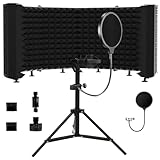
- Superior Noise Reduction – Designed with high-density acoustic foam, our microphone isolation shield effectively reduces background noise and echo, ensuring crisp, professional-quality recordings
- Foldable & Adjustable Design – Features a multi-panel design with adjustable angles to customize your recording space. The foldable structure makes it compact and easy to store or transport
- Versatile Recording Use – Perfect for home studios, professional recordings, podcasts, voiceovers, gaming, and broadcasting, providing an improved audio experience in any environment.
- Durable & Lightweight Construction – Built with a sturdy metal frame and high-quality foam, this mic shield offers durability while remaining lightweight for easy setup and portability
- Universal Compatibility – Compatible with most standard microphone stands and desktop setups, making it an essential accessory for musicians, podcasters, and content creators
Shopping ad

- ♪【The package contains】♪: Microphone Isolation Shield*1, Metal Thread Adapter*2 (Adapt most microphones),POP Filter*1,Storage desk*1,Adjustable Stand*1 and instruction manual. (The height of the isolation shield can be adjusted freely) *NOTE: Microphone is NOT included.
- ♪【Designed for recording】♪: The inside of the microphone cover is made of absorbent cotton material, which maintains the clarity of the human voice and the instrument during recording, eliminating the interference of the audio waves and the external environment.Made of high-quality steel, the Microphone Isolation Shield is more rugged and scratch-resistant.
- ♪【Easy to install】♪: The Microphone Isolation Shield has steel clips on the back. Insert the steel clip into the bracket and tighten the screws.The height of the stand + Isolation Shield is 175CM, and you can install the isolation shield to any height you want.
- ♪【Filter the sound】♪:The attached pop filter can help you to Banish the dreamed hissing and lisping sounds that come when promoting the letter "S" and blocks that ugly "plugs" that follows "B" and "P" And make your voice clear as water. The storage desk can hold the documents and props you need for recording.
- ♪【Special recording】♪: This acoustic shield features an acoustic foam front and a vented metal back plate. If you need to record in the studio, this Microphone Isolation Shield will give you unexpected results.30 days free refund and one year warranty.
Shopping ad

- 【SPECIFICATION】: Inside size after setup: 8'' (L) X 10'' (W) X 12'' (H), large space for various studio equipment of any sizes; Exterior size: 12'' (L) X 12'' (W) X 16'' (H); Folded size: 12'' (L) X 12'' (W) X 6'' (H); Weight: 2 lbs; Equipped with holes for audio cables and mic stands【SPACE-SAVING & PORTABLE & FOLDABLE】: This sound booth is portable and foldable. It's light weight and ready-to-go. Just put in your suitcase and record wherever you are
- 【NOTABLE SOUND ABSORPTION & RECORDING CLARITY IMPROVEMENT】: All inside surfaces of this mic isolation shield are treated with TroyStudio 2" thick dense egg-crate foam for optimal acoustical treatment. It effectively eliminates echoes and reflections while reducing ambient noise. As a result, recordings are well protected from room reverb by 92.7%, producing a dry, clear sound that greatly enhances recording clarity. If you don't have a professional recording studio, it is an excellent alternative
- 【REDESIGNED STRENGTHENED STRUCTURE】: This new-version portable studio booth includes 5 pieces of high-density, 2-inch thick sound dampening foam that will not sag over time; A specially designed backing panel adds significant support to prevent the entire system from becoming flimsy; Additionally, For enhanced compactness, utilize the elastic bands provided with the felt shield case to firmly secure the foam positioning
- 【BROAD COMPATIBILITY】: Both stand mount and table use available. Compatible with all the microphones, such as vocal microphone, condenser microphone, usb mic, phone, recorder pen, condenser hanging mic. Work with various mic stands, like desktop mic stand, boom arm stand, floor stand and ceiling holder stand. Please note that this mini sound shield can only be mounted on stands with a diameter smaller than 0.86 inches
- 【ENDLESS APPLICATION】: Ideal for versatile recording needs including podcasting, audiobooks, vocal/ musical, voice over work, instruments, percussion... Perfect for vocal recording, home studio, music studio, youtube videos, streaming, singing, office, apartment, podcast studio, basement room, closet booth, bedroom and more. 【QUICK INSTALLATION】: Setup can be effortlessly completed within 1 minute, and disassembly takes only 20 seconds. NOTE: Please read the instruction before installation, since wrong setup steps may lead to unstable issues
Product prices and availability are accurate as of the date/time indicated and are subject to change. Any price and availability information displayed on Amazon at the time of purchase will apply.
Free tools Windows power users keep installed
One-click scans. No signup required.




