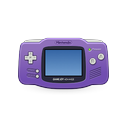
VisualBoyAdvance-M
visualboyadvance-m.org
- Free plan
- Windows
- macOS
- Linux
- Android
What VisualBoyAdvance-M is
VisualBoyAdvance-M is a free, open-source emulator for Game Boy, Game Boy Color and Game Boy Advance. Builds are available for Windows, macOS, Linux and Android. The project lists Windows XP and later, macOS and Linux among its supported desktop systems; Android nightly builds cover arm, arm64, riscv and x86_64. Build options enable Game Boy and Game Boy Advance linking by default, and a Libretro core can be built, with nightly builds provided. The build options include Vulkan video output, platform-specific Direct3D support on Windows and FFmpeg audio and video recording enabled by default. They also enable a debugger by default and provide Lua scripting support for the wxWidgets port. Graphics upscaling is supported, but the project cautions that xBRZ and ScaleFX may not run on older or weaker systems. Windows and Mac builds are listed in releases, while Linux distributions may offer packages under visualboyadvance-m or vbam. The project identifies its license as GPL-2.0 and points users to Discord for support.
Who it suits
It suits players looking to run Game Boy, Game Boy Color or Game Boy Advance games on desktop or Android. Its linking, debugger and scripting options may also suit users who want those tools.
Good to know, and what to watch
- Free and open-source under GPL-2.0.
- Builds available for Windows, macOS, Linux and Android.
- Game Boy and Game Boy Advance linking is enabled by default.
- FFmpeg audio and video recording is enabled by default.
- Includes Vulkan video output and a debugger.
- xBRZ and ScaleFX may not run on older systems.
- Android releases are nightly builds.
Plans
Every plan and priceVisualBoyAdvance-M
Free plan
Getting started
- Open the official VisualBoyAdvance-M website
- Choose a Windows or Mac build from the releases tab
- Install a Linux distribution package named visualboyadvance-m or vbam
- Select the Android nightly image matching your device architecture
- Use the project’s Libretro nightly build when running it through Libretro
Limits to check
The project cautions that older or weaker systems may not run the higher-level xBRZ and ScaleFX scalers. Android availability is provided through nightly builds.
The verdict
VisualBoyAdvance-M supports several Game Boy systems across desktop and Android builds, with linking and recording options. Older or weaker hardware may not handle its higher-level graphics scalers.
Questions people ask
How much does VisualBoyAdvance-M cost?
It is free, with a free plan priced at no cost.
Which systems can it emulate?
It supports Game Boy, Game Boy Color, and Game Boy Advance.
Which platforms have builds?
Builds are listed for Windows, macOS, Linux, and Android, with nightly Libretro builds also available.
Does it support linking between consoles?
Yes. GBA and GB linking functionality is enabled by default in the build options.
Is VisualBoyAdvance-M open source?
Yes. The repository identifies its license as GPL-2.0.
What the maker publishes
- Android build options
- The maker’s site says Android builds include arm, arm64, riscv, and x86_64 images, and recommends arm64 for phone users. source
- Android support
- Android builds are available in nightly releases for arm, arm64, riscv and x86_64. source
- Community and support
- The README directs users to the project’s Discord server and recommends a factory reset before reporting issues. source
- Debugger and scripting
- The build options enable the debugger by default and include Lua scripting support for the wxWidgets port. source
- Desktop support
- The project lists Windows XP+, macOS and Linux as supported system requirements. source
- Downloads
- The project lists Windows and Mac builds in its releases and nightly builds for Windows, macOS, Libretro and Android. source
- GBA and GB linking
- Its build options enable GBA/GB linking functionality by default. source
- Graphics
- The build options include Vulkan video output and platform-specific Direct3D support on Windows. source
- Libretro
- A Libretro core can be built, and nightly builds are provided for Libretro. source
- License
- The repository identifies its license as GPL-2.0. source
- Link functionality
- The build options include GBA/GB linking functionality, enabled by default. source
- Linux availability
- The README lists Linux as a supported system requirement and says distributions may offer packages under visualboyadvance-m or vbam. source
- Nightly builds
- Nightly builds are available for Windows, macOS, Libretro, and Android. source
- Older hardware
- The project notes older or weaker systems may not run its higher-level xBRZ and ScaleFX scalers. source
- Performance limitation
- The README cautions that older and weaker systems may not run the higher-level xBRZ and ScaleFX scalers. source
- Purpose
- VisualBoyAdvance-M is an emulator for Game Boy and Game Boy Advance. source
- Recording
- FFmpeg audio and video recording is enabled by default in the build options. source
- Scripting
- Lua scripting support for the wxWidgets port is enabled by default in the build options. source
- Security and trust
- The maker’s site advises users to get releases from the project’s official GitHub, its site, or its official Snapcraft channel. source
- Support
- The project links to a Discord server and advises users with issues to try Help → Factory Reset. source
- Video and audio features
- Build options include Vulkan video output, FFmpeg audio/video recording, and multiple platform-specific sound outputs. source
- Windows and macOS downloads
- The project README directs users to its releases tab for Windows and Mac builds. source
Checked against the maker's pages on 5 Oct 2026.