The Tool Desk
Outbyte Driver Updater FREEScan for outdated or missing drivers - takes under a minuteDriver Scan →Outbyte PC Repair FREERepair Windows errors before they cause bigger problemsFix Now →The Geeks Club is reader-supported. When you buy through links on our site, we may earn an affiliate commission. As an Amazon Associate I earn from qualifying purchases. Learn more
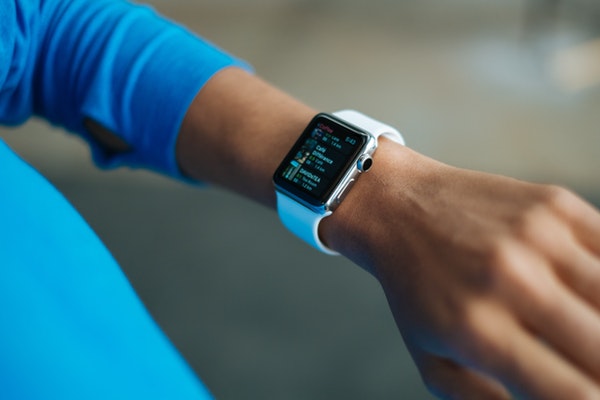
Apple never fails to surprise us with its amazing line of products. These products not only accommodate unique features but also focus on keeping its users healthy and safe. The latest wearable from Apple – Apple Watch Series 4 is a case in point. The digital watch runs a safety-focused feature known as ‘Fall Detection’ that can come to rescue of a person in emergencies and accidents. Let us learn about this feature in a bit more detail and see how to enable Fall Detection in Apple Watch Series 4.

Manually Enable Fall Detection in Apple Watch
The wearable from Apple uses the new next-generation gyroscope and accelerometer, capable of detecting a fall and provide options to contact emergency services if necessary.
It is not enabled by default but turns on automatically only when you’ve set your age (over 65 years old) on Apple Watch or in the Health app.
To turn on or enable the ‘Fall Detection’ in Apple watch,
Shopping ad

- LEAVE YOUR PHONE IN YOUR POCKET: Apple Watch Series 6 GPS Model lets you call, text, and get directions from your wrist, while leaving your phone in your pocket. It offers multiple connectivity options, including: Bluetooth, Wi-Fi, and NFC to suit all of your possible needs.
- ALWAYS-ON RETINA DISPLAY: You no longer need to raise your wrist or touch the screen to see the time or other information on your watch face, because the display never sleeps. All you need to do is glance to find the time or your workout metrics right there where you want them.
- ECG ON YOUR WRIST: With the ECG app, Apple Watch Series 6 is capable of generating an ECG similar to a single-lead electrocardiogram. It’s a momentous achievement for a wearable device that can provide data for doctors and peace of mind for you wherever may be during the day.
- WORKOUTS THAT DON'T QUIT: Cycling, yoga, swimming, high-intensity interval training.the list goes on. You me it, Apple Watch measures it. Set workout-specific goals, see full summaries when you’re done, and track how you’re trending over time in the Activity app on your iPhone.
- GET LOST IN YOUR MUSIC: With Apple Music on your wrist, you’ve got 60 million tracks of musical motivation to take you places. You can also catch up on the latest podcasts or listen to an audiobook if that's your thing. Stream everything you need right from your watch, even without your phone.
- Open the Apple Watch app on your iPhone, then tap the My Watch tab.
- Tap Emergency SOS.
- Turn ‘Fall Detection’ on. If you’ve already entered your age during the Apple Watch setup or in the Health app and you’re age 65 and over, this feature is enabled +by default.

- In an event of misfortune, if you fall the watch does the following to detect if you’ve actually fallen, tripped or slipped while wearing it:
- Taps you on the wrist.
- Sounds an alarm.
- Displays a hard-fall alert.
- You can choose to contact emergency services or dismiss the alert by tapping “I fell, but I’m OK” or by scrolling down and tapping “I did not fall.”

In case you want to call emergency services, drag the Emergency SOS slider in the alert. Apple Watch will instantly make the call if it finds that you did not move for more than a minute.
On the other hand, if it finds you’re moving, the watch will not make a call (Selected countries and regions have multiple emergency service numbers. So, for such countries, Apple Watch will call the number associated with ambulance services).
Shopping ad
![Apple Watch SE 3 [GPS 40mm] Smartwatch with Starlight Aluminum Case with Starlight Sport Band - S/M. Fitness and Sleep Trackers, Heart Rate Monitor, Always-On Display, Water Resistant](https://m.media-amazon.com/images/I/31YiTby0pOL._SL160_.jpg)
- GET SMARTER HEALTH INSIGHTS—Apple Watch SE 3 is an advanced health tracker that helps you better understand your body. The smartwatch sends alerts for an irregular heart rhythm, or an unusually high or low heart rate.* You can view your overnight health tracking metrics with the Vitals app,* track your sleep score, and get sleep apnea notifications.*
- A GREAT FITNESS TRACKER—SE 3 can track your workouts in a healthy number of ways—from running and strength training to simply achieving your 10K steps a day. With real-time metrics and Workout Buddy powered by Apple Intelligence from your nearby iPhone,* you’ll hit your goals like never before.
- KEEP HELP CLOSE AT HAND—SE 3 is a smartwatch that can detect a hard fall or severe car crash and automatically help connect you to emergency services and notify your emergency contacts.* Check In can automatically notify a loved one when you’ve arrived at your destination.
- WOMEN’S HEALTH INSIGHTS—SE 3 has advanced sensors that track your wrist temperature while you sleep. With this smartwatch, you can log your periods and symptoms, get period predictions, and get notified of cycle deviations.*
- GREAT BATTERY LIFE AND FASTER CHARGING—Enjoy a smartwatch with all-day, 18-hour battery life* from sunup to sundown. Then charge up to twice as fast as SE 2* and get up to 8 hours of battery in just 15 minutes.*
What do you think of this feature in Apple Watch? Does it help if you enable Fall Detection in Apple Watch Series to actually track if the watch fell out of your wrist?
Quick Recap
Shopping ad
![Apple Watch SE 3 [GPS 40mm] Smartwatch with Midnight Aluminum Case with Midnight Sport Band - S/M. Fitness and Sleep Trackers, Heart Rate Monitor, Always-On Display, Water Resistant](https://m.media-amazon.com/images/I/31Gq8SToFJL._SL160_.jpg)
- GET SMARTER HEALTH INSIGHTS—Apple Watch SE 3 is an advanced health tracker that helps you better understand your body. The smartwatch sends alerts for an irregular heart rhythm, or an unusually high or low heart rate.* You can view your overnight health tracking metrics with the Vitals app,* track your sleep score, and get sleep apnea notifications.*
- A GREAT FITNESS TRACKER—SE 3 can track your workouts in a healthy number of ways—from running and strength training to simply achieving your 10K steps a day. With real-time metrics and Workout Buddy powered by Apple Intelligence from your nearby iPhone,* you’ll hit your goals like never before.
- KEEP HELP CLOSE AT HAND—SE 3 is a smartwatch that can detect a hard fall or severe car crash and automatically help connect you to emergency services and notify your emergency contacts.* Check In can automatically notify a loved one when you’ve arrived at your destination.
- WOMEN’S HEALTH INSIGHTS—SE 3 has advanced sensors that track your wrist temperature while you sleep. With this smartwatch, you can log your periods and symptoms, get period predictions, and get notified of cycle deviations.*
- GREAT BATTERY LIFE AND FASTER CHARGING—Enjoy a smartwatch with all-day, 18-hour battery life* from sunup to sundown. Then charge up to twice as fast as SE 2* and get up to 8 hours of battery in just 15 minutes.*
Shopping ad
![Apple Watch Series 11 [GPS 42mm] Smartwatch with Rose Gold Aluminum Case with Light Blush Sport Band - S/M. Sleep Score, Fitness Tracker, Health Monitoring, Always-On Display, Water Resistant](https://m.media-amazon.com/images/I/31caPPnRysL._SL160_.jpg)
- A FULL-FEATURED HEALTH TRACKER—Apple Watch Series 11 gives you invaluable insights about your body, right from your wrist. Take an ECG anytime* and get alerts for a high and low heart rate or an irregular rhythm*—so you can stay closer to your heart. You can also view your overnight health tracking metrics with the Vitals app* and be notified of possible sleep apnea.*
- KNOW YOUR SLEEP SCORE—With advanced sleep tracking, Series 11 gives you a daily sleep score. It’s an easy way to help measure and understand the quality of your sleep, so you can make it more restorative.
- GET HYPERTENSION NOTIFICATIONS—Did you know that Series 11 can spot signs of chronic high blood pressure? By analyzing how your blood vessels respond to beats of the heart, it can notify you of possible hypertension.*
- SAFETY FEATURES—A smartwatch that puts your safety first. Series 11 can detect a hard fall or severe car crash, automatically help connect you with emergency services, and notify your emergency contacts.* Check In can automatically notify a loved one when you’ve arrived at your destination.
- A POWERFUL FITNESS TRACKER—With advanced metrics and motivating features like Pacer, Heart Rate Zones, training load, and Workout Buddy powered by Apple Intelligence from your nearby iPhone*—Series 11 is made to help everyone stay active, from runners and hikers to strength-training enthusiasts.
Product prices and availability are accurate as of the date/time indicated and are subject to change. Any price and availability information displayed on Amazon at the time of purchase will apply.
Independent reader supportYour contribution helps us test, update, and keep practical guides available for everyone.
